A digital lookbook is an online version of a collection’s styled images, published as a flipbook, a web page or a shoppable gallery. Making one takes two kinds of tool. AI tools make the images: on-model shots from flat lays, the same model in every look, back views and detail crops. A lookbook maker turns those images into the book, with product links, video and a share link.
Problems start between the two kinds of tool. A brand picks an image tool and makes ninety frames. Then the book tool asks for a PDF, the wholesale platform asks for a line sheet, and the product page needs a plain front view that nobody made.
This guide covers the whole chain. It sorts the image tools by the frame each one makes, and the book tools by where the book will live. It ends with the label rules that now apply to AI images in a lookbook. It is written for fashion brands with 20 to 500 products, and for the agencies that make lookbooks for them.
Key Takeaways
- A digital lookbook has three layers: the images, the book, and the place it is delivered. Pick one tool per layer, starting from the last one.
- Pick the delivery first. A wholesale buyer on JOOR, a shopper on your Shopify store and a press contact with a PDF need different files.
- Image tools differ on one thing that matters most: whether the same model stays in every look. FASHN, Photoroom and WearView each describe a saved or reused model.
- Several book tools now use AI too. Flipsnack describes an AI lookbook generator that pulls in images, prices and descriptions. Stylitics says it builds outfits from catalog data.
- Every look needs a plain worn frame, a back view and a detail crop, as well as the styled hero. The product page needs the plain frame.
- An AI model that looks real can count as a deep fake under EU Article 50. The visible label goes in the book itself, because a hidden metadata mark does not count as your label.
What is a digital lookbook?
A digital lookbook is a collection’s styled images published online instead of in print. It can be a flipbook made from a PDF, a page on your own site or a gallery inside a wholesale platform. It shows how the pieces are worn together, and it links each look to the products in it. Brands send it to wholesale buyers and press, and they publish it for shoppers.
A lookbook is not a line sheet. JOOR, a wholesale platform, calls the lookbook the inspiration tool and the line sheet the conversion tool (joor.com, accessed September 2026). The line sheet carries every SKU, with price, sizes, colorways and fabric. Many digital lookbooks now do some of both, because each look links to a product page or an order form.
For the shoot itself, the six frames every look needs covers the shot list, the four readers of a lookbook and what a shoot costs. This article is about the tools.
The three layers of a digital lookbook
Every digital lookbook passes through three layers. Each layer needs something from the one before it.
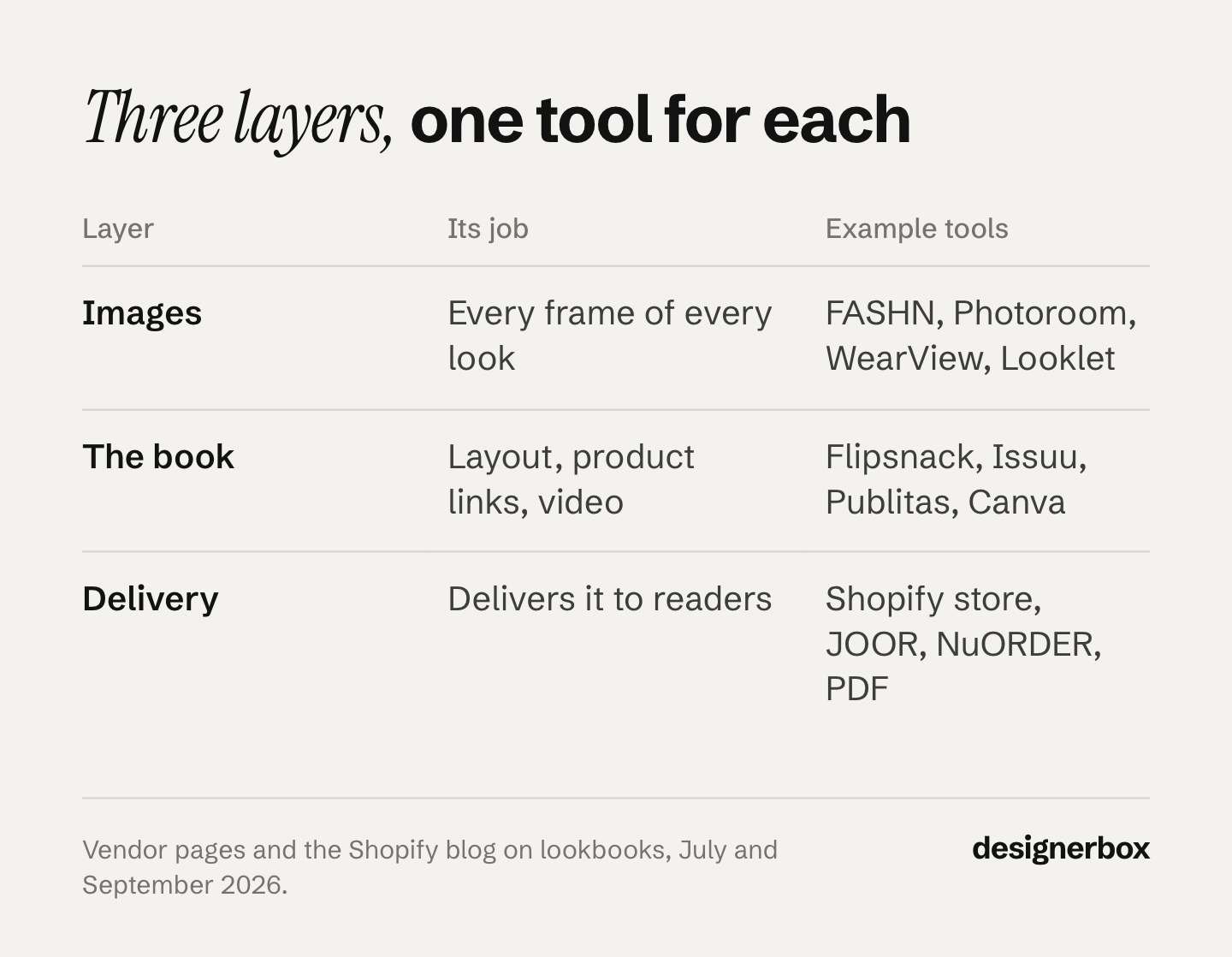
| Layer | Its job | Tools in this guide | What it needs from the layer before |
|---|---|---|---|
| Images | Make every frame of every look | WearView, FASHN, Photoroom, Looklet, DesignerBox | Garment photos: flat lay, hanger, mannequin or on a person |
| The book | Lay out the looks, add links and video, publish | Flipsnack, Issuu, Publitas, Paperturn, Canva, Stylitics | Final images, in order, with product links or a product feed |
| Delivery | Put the book in front of its reader | Your Shopify store, JOOR, NuORDER, email, a PDF for press | A share link, an embed code, a PDF or a product sync |
Start from the bottom row. A book for wholesale buyers belongs in a platform they already use. A book for shoppers needs product links that work on a phone. A book for press can stay a PDF. Once you know the reader, you know which book tool fits, and which frames the image tool has to make.
AI tools for lookbook images
The best AI tools for fashion lookbooks are the ones that start from your real garment photo and keep one model across every look. A lookbook fails when look three shows a different face from look eleven. It also fails when the garment changes on the way from the flat lay to the model.
The tools below each describe a garment upload and a reused model. They are not ranked. Each note uses the vendor’s own words, from pages read on 24 September 2026.
| Tool | Starts from | Same model across looks | Also makes |
|---|---|---|---|
| WearView | Flat lay, hanger or a photo on a person | A library of AI models to choose from | Video for social ads |
| FASHN | A product photo, a model image or its own library | ”Reuse the same model across looks, angles, and campaigns” | New angles, and video from a result |
| Photoroom | A worn shot or a flat lay | Custom models saved in Brand Kit for future collections | 2K and 4K results, batch editing, an API |
| Looklet | Front and back ghost images | Digitized real models, more than 1,000 of them | Automated styling of outfit combinations |
WearView accepts “any clothing photo”, laid flat, on a hanger or on a person, as well as accessories, bags and footwear. It offers a library of AI models and a video tool for social ads. It says every image comes with full commercial usage rights (wearview.co, September 2026).
FASHN says you can “reuse the same model across looks, angles, and campaigns” and turn a result into video. It also says it does not use your uploads or results to train models unless you opt in through a separate agreement (fashn.ai, September 2026).
Photoroom starts from “a shot of someone wearing your products or simple flat lays”. You can save custom models in Brand Kit and reuse them “for future collections”. It offers 2K and 4K results, batch editing and an API (photoroom.com/tools/virtual-model, September 2026).
Looklet works from front and back ghost images of your garment. It offers digitized real models and automated styling, where you pre-select garments to combine (looklet.com, September 2026). A book built on real, licensed faces suits brands that avoid fully generated people.
Whatever you pick, test it on the hardest pieces in the collection first: a stripe, a print, a logo, a knit. For more tools and a longer test plan, see 15 AI fashion photography tools compared. For the mood and location frames around the looks, AI fashion editorial tools sorts 14 tools by frame.
The frames the image tool has to make
A styled hero per look is not enough. The book tool, the product page and the wholesale buyer each ask for other frames. Plan these per look before the first run:
- The styled full look, front. The frame the book is built around.
- The back view. Buyers ask for it, and not every tool makes it by default.
- The plain worn frame. Nothing tucked or rolled, so a shopper can judge length and fit.
- The detail crop. Fabric, seam, hardware or print at full size.
- One movement frame across the book, for drape and weight.
Keeping one model across all five frames is where most sets drift. Keeping AI fashion images consistent covers the two ways to hold a face and a body across a drop.
Lookbook makers that build the book
A lookbook maker takes the finished images and makes them into something a reader can page through, click and share. The main split is how you start: from a finished PDF, from a template, or from your product data. A shoppable lookbook is one kind of shoppable content, one of the six formats of visual commerce.
| Tool | You start from | Shoppable links | On your own site | AI named on the page |
|---|---|---|---|---|
| Flipsnack | A PDF or a template | Clickable hotspots, shopping lists | Embed and custom link | An AI lookbook generator, alt text, motion |
| Issuu | A PDF | Shopping links on pages | No-code embed | None named |
| Publitas | A PDF, with a product feed | Shop-the-look and hotspots | Embed | None named for images |
| Paperturn | A PDF | Bulk link import for hundreds of SKUs | Own domain, white label | None named |
| Canva | A template | Links to product pages | A lookbook website | Magic Design layouts, Magic Write text |
| Stylitics | Your catalog data and images | Hotspots and cart links | On your site | An outfit generator from catalog data |
Flipsnack lets you upload a PDF or start from lookbook templates. It adds clickable hotspots, video and analytics, and you can embed the book on your site. Its page describes an “AI lookbook generator” that builds the book for you, “pulling in images, prices, and descriptions” from a product sheet you connect (flipsnack.com/digital-lookbook, September 2026). There is a free plan.
Issuu starts from an uploaded PDF. It adds shopping links, embedded video and statistics, and a no-code embed puts the book on your site (issuu.com/solutions/fashion/digital-lookbook, September 2026).
Publitas adds shop-the-look links and hotspots to a PDF, with automated SKU tagging. It supports GIFs, 3D images and video, and its analytics connect to GA4 (publitas.com/digital-lookbook, September 2026). Its own design guide recommends tap-to-reveal hotspots that link straight to the product page, muted video, and a mobile-first layout (publitas.com/blog, January 2026).
Paperturn starts from a designed PDF. Its bulk link import maps “hundreds of SKUs”, and you can publish on your own domain with full white-label control. Analytics show views and clicks by page and by product (paperturn.com/online-lookbook-creator, September 2026).
Canva starts from templates. You can publish a lookbook website that links to product pages, or download a print-ready PDF. Its page names Magic Design for new layouts when you add photos, and Magic Write for product descriptions and collection notes (canva.com/collection/fashion-lookbook, September 2026).
Stylitics works differently from the others. It says it “automatically generates outfit combinations from catalog data”, and your team reviews or removes each one before it goes live. The looks carry hotspots and cart links, and they update as stock changes (stylitics.com, September 2026). It suits a retailer with a large catalog more than a brand with one seasonal book.
A lookbook on your own Shopify store
You do not need a flipbook to publish a lookbook on your store. Shopify’s own guide lists three ways to make a lookbook shoppable: hotspots on the image, images that link to product pages, and lookbook images placed on the product pages themselves (shopify.com, July 2025). The same guide names themes and apps that support it. For the product page those images land on, Shopify product page optimization goes through its nine fields in order.
Google Shopping can show lookbook frames too. Merchant Center has a lifestyle image attribute for products shown “in a real world context, for example, clothing worn by a model”, and you can add up to five per product (support.google.com, accessed September 2026). These images must carry no text, logos or watermarks.
Wholesale lookbooks and line sheets
Wholesale buyers often see your lookbook inside the platform they order from, not as a flipbook. Two platforms describe lookbook features for brands:
- JOOR offers virtual showrooms with drag-and-drop templates, 360-degree media and shoppable lookbooks. Brands share them by link or QR code and can tailor a showroom to each retailer. Buyers order from linked, shoppable line sheets (joor.com/virtual-showroom, September 2026).
- NuORDER describes line sheets with 360-degree imagery, video and shoppable hotspots, tied to live inventory (nuorder.com, September 2026).
For wholesale, the frames that matter most are the plain ones. A buyer compares your sheet with other brands’ sheets and needs to see construction and colorway without styling. Plan these frames in the same run as the styled looks, so the two books match.
How to make a digital lookbook
Here is the order that avoids rework. Each step feeds the next one.
- Name the reader and the delivery. Wholesale platform, your store, email or a press PDF. This picks the book tool.
- Write the look list. Number every look, list the products in each, and note the story block it belongs to.
- Set the continuity rules. One model, one light, one lens feel and one styling rule for the whole book. Write them down before any image exists.
- Photograph the garments plainly. A flat lay, a hanger or a mannequin shot per piece, front and back, in even light. This is the input for every AI tool above.
- Make the frames per look. Styled front, back, plain worn frame and detail crop. Check prints, logos and hems against the real garment.
- Build the book. Order the looks, add product links or a product feed, add video, and set the share link or embed.
- Add the AI label where it is needed, and keep the original files with their metadata.
- Check it on a phone. Tap every hotspot, and time the first page on a mobile connection.
Step 5 is where most time goes. Fifteen looks with four frames each is sixty frames before the social crops. Generating each look as a set keeps one look from drifting between its own frames.
Where the AI label goes in a digital lookbook
This is general information, not legal advice. Check the rules in each market where the lookbook runs.
The EU. Article 50 of the EU AI Act has applied since 2 August 2026. A business that publishes a deep fake must say that it is AI-generated or AI-edited, and the reader must see this at first exposure (European Commission FAQ, accessed September 2026). A realistic AI person can count as a deep fake, because it is enough that the person could plausibly exist. An AI product image can count too, if it can mislead people about how the product really looks.
The Commission also says a business cannot rely on the machine-readable mark the AI tool adds. So the label must be visible in the lookbook itself: on the cover, on the first spread, or next to each AI look. The EU offers optional icons for this label (European Commission, accessed September 2026).
New York. Since 9 June 2026, anyone who makes an ad must disclose a synthetic performer in it, when they know one is there (New York General Business Law 396-B, accessed September 2026). A lookbook used as advertising is worth checking against this rule. If a digital model is built from a real model, New York’s Fashion Workers Act also requires that model’s written consent (New York State Department of Labor, accessed September 2026).
Google Shopping. Merchant Center says all images created with generative AI must contain metadata that shows they are AI-generated (support.google.com, accessed September 2026). If lookbook frames go into your product feed, keep the file the AI tool gave you. Check that your crop and export steps keep that metadata.
The wording and placement of labels are covered in labeling AI-generated fashion images.
A lookbook run in DesignerBox
Anyone can make an AI picture. Making hundreds that still look like your brand is the hard part. DesignerBox is AI creative production for brands and agencies. It makes the image layer of a lookbook from your real garment photos, and it makes the next season’s book to the same standard. The fashion product photography page covers the drape, the fabric weight and the true dye color across cutouts, on-model views and detail crops.
You set the brand once: palette, fonts, logos and rules. The workflow reads them on every run. You save the model once, and every look uses the same person. Dress my model puts that job behind a short form, so a colleague can run it without opening the workflow.
The same garment photos make the frames a lookbook forgets. Clothing catalog turns one garment into four shots: front, three-quarter, back and a fabric close-up. An avatar run returns nine fixed poses for 25 credits, which gives the book a cast to choose from. The image editor makes one edit after another, and the picture keeps its detail and resolution.
Batch runs one workflow over the whole collection, and you review the results in one pass. You see the cost before each run.
The full workflow from the first product photo to the finished ad, in one subscription. That includes the video editor for the movement frames. DesignerBox does not build the flipbook itself. You download the results, or send them with a webhook or an S3 step, and then bring them into the book tool you chose above.
The limits, stated plainly:
- Uploading your own photos and the commercial license start on the Pro plan. AI video, virtual try-on, upscaling, the image editor and the video editor start on the Premium plan.
- Team features are on the Ultra plan, and every plan below Ultra is one seat.
- We make no accuracy percentage claim. Test your own garments, the same as for every tool above.
DesignerBox for fashion brands shows on-model, scene and video results from one garment photo. Plans and credits are on the pricing page.
A free plan for your first run
Start from a template, add your brand and your products, and see the cost before you run it.
FAQ
What is a digital lookbook?
A digital lookbook is a collection’s styled images published online, as a flipbook, a page on your site or a gallery in a wholesale platform. Each look shows how pieces are worn together and usually links to the products in it. Brands send it to wholesale buyers and press, and publish it for shoppers.
What are the best AI tools for fashion lookbooks?
Use two kinds of tool. For the images, pick a tool that starts from your garment photo and keeps one model in every look. FASHN, Photoroom and WearView each describe a reused model. For the book, Flipsnack, Issuu, Publitas, Paperturn and Canva turn the images into a shoppable lookbook.
How do I make a lookbook for my clothing brand?
Name the reader first: wholesale buyer, shopper or press. Write the look list and the continuity rules. Photograph each garment plainly, front and back. Make a styled front, back, plain worn frame and detail crop per look. Then build the book, add product links and check it on a phone.
Can AI make a whole lookbook?
AI can make the frames, and some book tools can lay out the book. The fabric close-up and the fit are where generated frames fail most often, so check every look against the real garment before the book goes out.
What is the difference between a lookbook and a line sheet?
A lookbook shows the collection styled, to sell the mood and the way pieces go together. A line sheet lists every SKU with price, sizes, colorways and fabric, so a buyer can order. Wholesale platforms such as JOOR and NuORDER now link the two, so a buyer can order from the lookbook.
Do I have to label AI images in a lookbook?
The market decides. In the EU, a realistic AI person or a misleading AI product image can count as a deep fake, and the label must be visible when the reader first sees it. New York requires disclosure of synthetic performers in ads.
Sources
- Vendor pages read 24 September 2026 (not linked): wearview.co; fashn.ai; photoroom.com/tools/virtual-model; looklet.com; flipsnack.com/digital-lookbook; issuu.com/solutions/fashion/digital-lookbook; publitas.com/digital-lookbook; paperturn.com/online-lookbook-creator; canva.com/collection/fashion-lookbook; stylitics.com/resources/blog/digital-lookbook and stylitics.com/products/outfitting/shop-the-look; joor.com/virtual-showroom and joor.com/line-sheet-software; go.nuorder.com/brands/linesheets
- Vendor articles read 24 September 2026 (not linked): WearView, 7 best AI tools for fashion lookbooks in 2026 (wearview.co, May 2026); Publitas, Digital Lookbook Design Best Practices for Retail Teams (publitas.com, 15 January 2026)
- JOOR: Line sheets vs lookbooks in fashion, accessed September 2026
- Shopify: Digital lookbook, create one online, 4 July 2025
- Google Merchant Center Help: lifestyle image link, accessed September 2026
- European Commission: transparency obligations under Article 50 of the AI Act, accessed September 2026
- European Commission: EU icons for labelling AI-generated content, accessed September 2026
- New York General Business Law 396-B, accessed September 2026
- New York State Department of Labor: Fashion Workers Act FAQs, accessed September 2026
- DesignerBox for fashion brands, Dress my model and Batch (designerbox.ai, September 2026)
Tool features verified from each vendor’s own pages as of September 2026. Features change often, so check each vendor’s page before you build a season around one. Individual results vary.