
A Black Friday checklist for an online store has 28 tasks in six stages: products and prices, listings, campaign creative, review and scheduling, sale week, and the record you keep after it. Black Friday is 27 November 2026. Work back from that date, because Amazon, Google and Meta each set a deadline or a review time that you cannot move.
Here is the problem with most lists. They put 25 tips in one pile, and the tips have no dates. Some of the work has a hard date that has nothing to do with your team. Amazon closes its deal window on 20 October. In the EU, the price you charge from 28 October decides the “was” price you may print on 27 November.
This checklist is for brands and agencies that sell 20 to 500 products online. It gives each task a stage and each stage a date, and it marks which dates come from a platform and which are our advice. Every platform rule below was read on the platform’s own page in October 2026.
Key Takeaways
- Start from the date. Black Friday is 27 November 2026 and Cyber Monday is 30 November. On 2 October that leaves eight weeks.
- Three dates belong to Amazon. US deal submission closes on 20 October, and FBA inventory has to arrive by 21 or 28 October.
- The price clock starts early. The EU “prior price” is the lowest price in at least the 30 days before the reduction. For 27 November that window opens on 28 October.
- Ad review is short and still needs a margin. Meta and TikTok say most ads are reviewed within 24 hours. Google says one business day and tells you to submit several days ahead.
- More than half of the sales come from a phone. Adobe counted 55.2% of US Black Friday online sales on mobile in 2025, so check every image at phone size.
- Count the files first. Ten products in four ad ratios is 40 images, before a Cyber Monday version.
What is a Black Friday checklist for an online store?
A Black Friday checklist is a dated list of the work a store has to finish before the sale starts. It covers which products go on sale, what the offer is, what the listing shows, which ads and emails run, and when each one is submitted. A good one puts the tasks in the order the deadlines arrive.
The day is worth the work. One forecast expects US shoppers to spend $12.9 billion online on Black Friday 2026, up 9.2% on 2025, and $15.1 billion on Cyber Monday. In 2025 the same source counted $11.8 billion on Black Friday.
Those figures are from Adobe Digital Insights, which tracks US online sales (news.adobe.com, forecast published 28 September 2026).
A small team cannot prepare every product for that traffic. So the first stage picks the products, and every later stage works only on those.
The 2026 dates the platforms set
These dates are fixed by someone else. Put them in the calendar before you plan anything.
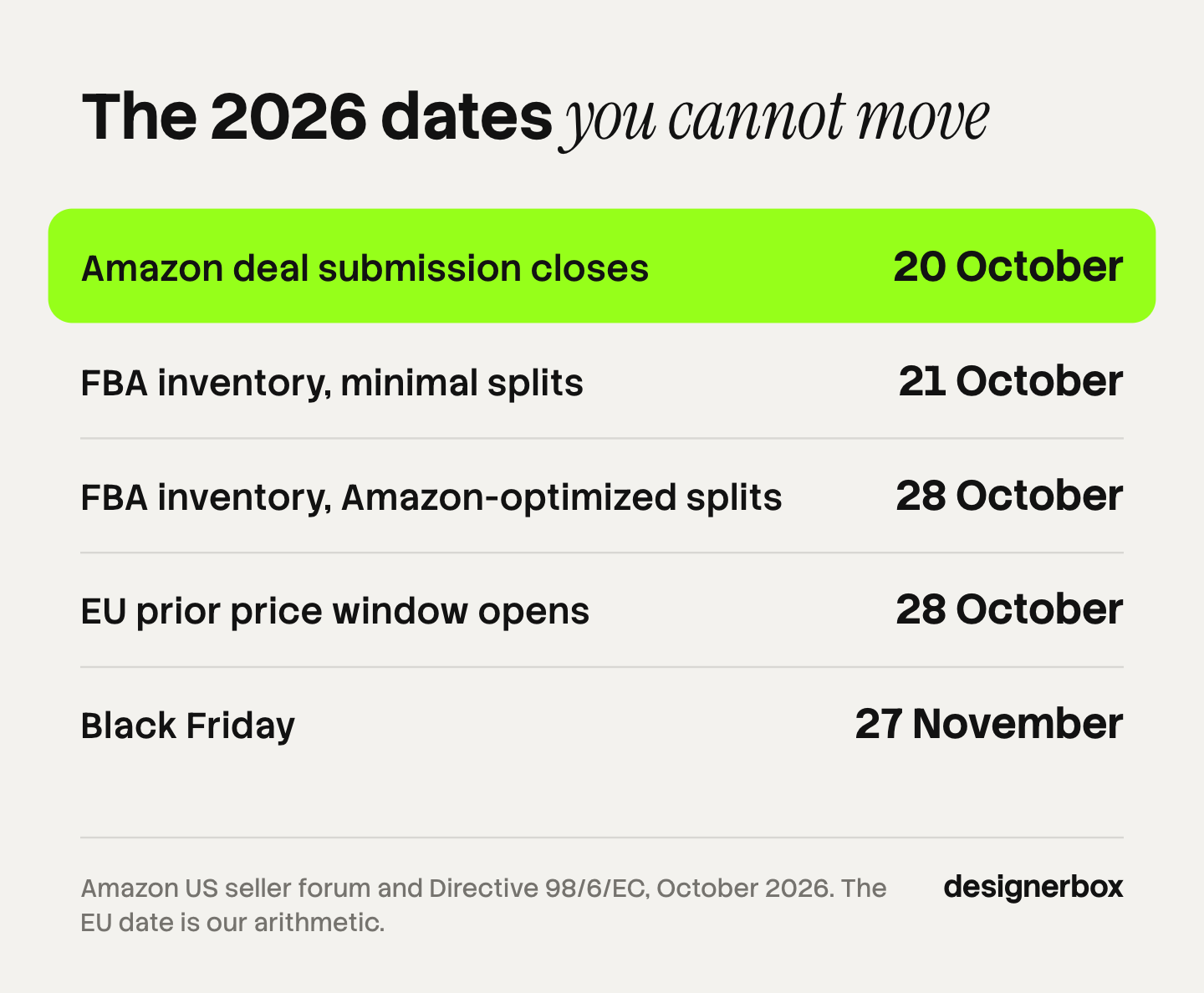
| Date | What happens | Who sets it |
|---|---|---|
| 14 October | Amazon Warehousing and Distribution shipments must arrive (US) | Amazon |
| 20 October | Amazon deal submission closes for Black Friday Week and Cyber Monday (US) | Amazon |
| 21 October | FBA inventory must arrive, with minimal shipment splits (US) | Amazon |
| 28 October | FBA inventory must arrive, with Amazon-optimized splits (US) | Amazon |
| 28 October | The 30-day window for the EU prior price opens | EU law, our date arithmetic |
| 27 November | Black Friday | Calendar |
| 30 November | Cyber Monday | Calendar |
The Amazon dates come from Amazon’s own post to US sellers, “Holiday 2026: Same fees, same eligibility, earlier deadlines” (sellercentral.amazon.com, October 2026). Amazon says inventory has to arrive by those dates “to ensure Prime-badge eligibility for your products during this year’s events”. The UK and EU stores have a separate post with different dates, so read the one for your store.
The same post says peak fulfillment fees apply from 15 October 2026 to 14 January 2027. Count them in the margin of every deal.
Stage 1: products and prices, by 14 October
This stage decides what the other five stages work on. The 14 October date is our advice. It leaves six days before Amazon’s deal window closes.
- Sort the catalog into three groups. Group one gets the most traffic and the most work. Group two is on sale with a standard treatment. Group three is not in the sale, and you leave it alone.
- Give each product one reason. Stock you want to move, a strong margin, a gift, a pair that sells together, or a new product. A product with no reason goes to group three.
- Choose the offer from the reason. Old stock takes a deeper markdown. A pair takes a bundle price. A low-margin bestseller takes a small discount or none.
- Hold the regular price from now. The price you charge in October is the price your sale is compared with. The section on the “was” price below gives the rule for each market.
- Check stock and inbound dates. For FBA in the US, the arrival dates are 21 and 28 October. Amazon also says capacity limits can be lower in November and December.
- Submit Amazon deals by 20 October. The window opened on 8 July. After 20 October there is no Black Friday Week deal to submit.
Write the result as one sheet: product, group, reason, offer, regular price, sale price. Every later task reads that sheet.
Stage 2: listings and product images, by 28 October
A discount brings a shopper to the page. The listing still has to answer what the product is, how big it is and what it looks like in use. Fix that before the ads, because every ad sends people here.
- Check the main image of every promoted product. On Amazon the main image needs a pure white background, RGB 255, 255, 255, and the product at 85% of the image (sellercentral.amazon.com, October 2026). Our guide to Amazon image requirements lists the rest.
- Meet the size floors. Amazon recommends 1,000 pixels or more on the longest side, which turns zoom on. Google asks for at least 500 x 500 pixels for all products from 31 January 2027 and recommends 1,500 x 1,500 (support.google.com, October 2026). Meta Shops need at least 500 x 500 and recommend 1,024 x 1,024 (facebook.com, October 2026).
- Keep sale graphics off the feed image. Google disapproves a product image with promotional text, a price, a call to action, a watermark or a border. The “30% off” badge belongs in the ad and on the page, never in the image you send to Merchant Center.
- Fill the missing images for group one. A second angle, a scale shot, a detail and the product in use. Show each variant that looks different.
- Look at each listing on a phone. Adobe counted 55.2% of US Black Friday online sales on a mobile device in 2025 (business.adobe.com, 2025 Holiday Shopping Recap, October 2026). If the main image is unclear at phone size, fix it first.
- Show both prices on the page. For a sale price to appear in Google’s free listings, Google says the original price and the sale price should be displayed on the landing page.
If the photo you start from is weak, every later file copies the fault. What a source product photo needs covers that one file. For the two image sets a sale needs, see Black Friday product photography.

Stage 3: campaign creative, by 11 November
This is the stage with the most files, and the one that slips. It ends on 11 November so that review and scheduling get a full week.
- Count the files before you make any. Products times ratios times versions. The section on file count below does the sum.
- Approve one master per product. One clean image of the product with the sale treatment: the badge, the price, the color. Every ratio is made from it.
- Make the ratios each placement asks for. Meta recommends 4:5 at 1,440 x 1,800 pixels for a feed image and 9:16 at 1,440 x 2,560 for Stories and Reels (facebook.com, October 2026). Google’s Performance Max takes horizontal 1.91:1, square 1:1 and vertical 4:5.
- Keep text inside the safe area. For Stories, Meta suggests leaving about 14% of the top, 35% of the bottom and 6% on each side free of text and logos.
- Fill the Performance Max asset group. Google recommends 4 horizontal images, 4 square images, 2 vertical images, 1 logo of each shape and 1 video of each orientation (support.google.com, October 2026). If you add no video, Google says it will create videos automatically when possible.
- Compare every file with the real product. Put it next to the source photo. Check the logo, the label, the color and every number in the image. A wrong price in an ad is a problem on the busiest day of the year.
One ad in every platform size has the full size table, and the AI tools a seasonal campaign needs maps a tool to each of these jobs.
Stage 4: review and scheduling, by 20 November
Every platform reviews what you submit, and every edit starts the review again. The aim of this stage is that nothing is waiting for approval in the last week. The 20 November date is our advice.
- Submit Meta and TikTok ads with a start date. Meta says “most ads are reviewed within 24 hours, although in some cases it may take longer”, and a scheduled ad is reviewed when you submit it and starts on the date you set (facebook.com, October 2026). TikTok gives the same 24 hours (ads.tiktok.com, October 2026).
- Submit Google ads several days ahead. Google says most ads are reviewed within one business day, and adds: “If you need your ad reviewed by a particular date, submit the ad several days in advance” (support.google.com, October 2026). Paused ads are reviewed too, so you can submit them paused.
- Stop editing after approval. Google says changes to an ad or its assets restart the review. TikTok says the same for a change to the creative.
- Submit the Google promotion early. Google checks policy soon after you submit, during weekday business hours. A second check runs when the promotion starts, and it is “typically completed within 12 hours of the promotion effective start time, but can take up to 24 hours” (support.google.com, October 2026).
- Schedule the discount in the store. Shopify lets you set a start date and an end date for a discount, in the time zone of your store (help.shopify.com, October 2026). Test the code on a real cart.
- Check the email setup. Gmail asks bulk senders for SPF, DKIM and DMARC, and for one-click unsubscribe on marketing messages. A bulk sender is anyone who sends close to 5,000 messages or more to personal Gmail accounts in 24 hours (support.google.com, October 2026). Google also says to keep the reported spam rate below 0.10%.
- Check every “was” price. One person reads each sale label against the price sheet from stage 1.
Stage 5: sale week, 27 to 30 November
The plan for these four days is short, because most changes now cost more than they earn. For the Meta ads that run in these days, Black Friday Facebook ads has the creative plan and the launch dates.
- Change as little as you can in a working ad set. Meta says an ad set leaves the learning phase after “about 50 results in the week after the ad set’s last significant edit” (facebook.com, October 2026). A big edit on Friday morning starts that count again.
- Pause the ads for a product with no stock left. Check stock twice a day against the sheet. Move the budget to a product in the same group.
Keep one person free to read disapprovals and replies. That person changes nothing else.

Stage 6: the record, from 1 December
- Write down what happened while you remember it. For each product: units sold, the offer, the ad files that ran and which one won. Save the masters and the method with it.
The holiday version uses the same products and the same ratios with a new treatment. A team that kept the record makes it in days. Holiday product photography covers which image slots allow a seasonal scene. For how long one ad lasts, see ad fatigue and when to replace a creative.
What does the law say about a “was” price?
A sale shows two prices, and the higher one has to be real. The rule is different in each market. This is general information, not legal advice.
| Market | The rule | Source |
|---|---|---|
| United States | The former price must be a real price, offered to the public “for a reasonably substantial period of time”. No number of days is given | FTC, 16 CFR 233.1 |
| European Union | The prior price is the lowest price the trader applied in a period not shorter than 30 days before the reduction | Directive 98/6/EC, Article 6a |
| United Kingdom | No fixed number of days. The saving has to be genuine, and the guidance lists the points to check | CTSI, Guidance for Traders on Pricing Practices |
The US text is in the FTC’s Guides Against Deceptive Pricing (ecfr.gov, October 2026). It calls a comparison false when “an artificial, inflated price was established for the purpose of enabling the subsequent offer of a large reduction”.
The EU text was added by Directive (EU) 2019/2161 (eur-lex.europa.eu, October 2026). Each member state applies it in its own law, and the directive lets states set different rules for some cases, such as a product on the market for less than 30 days. For a reduction that starts on 27 November, the 30 days begin on 28 October. If you run an early sale in that window, the early sale price can become your prior price.
The UK guidance was updated in April 2026 (businesscompanion.info, October 2026). It says a comparison is less likely to comply when the sale runs for a materially longer period than the higher price was offered.
Google has its own test for the crossed-out price in Shopping ads (support.google.com, October 2026). The discount must be greater than 5% and less than 90%. In the United States, the base price must have been charged for 5 days within the past 30, or 15 days within the past 200. In the UK, Germany, France and nine other countries, it must have been valid for 30 days within the past 200. Google adds that the annotation is not guaranteed to show.
How many files does a Black Friday campaign need?
The count is a multiplication, and it is larger than it feels.
| Step | Sum | Files |
|---|---|---|
| Promoted products | 10 | |
| Ratios per product: 4:5, 9:16, 1.91:1, 1:1 | 10 x 4 | 40 images |
| A Cyber Monday version | 40 x 2 | 80 images |
| A second language | 80 x 2 | 160 images |
That is our arithmetic for a small sale, with one image per ratio and no video. A store with 40 promoted products starts at 160 images before the second version.
Each file is simple. The risk is in the number: file 73 has the old price, or the logo from last year. So the method matters more than any one image. Fix the master, fix the rules, then make the ratios from it the same way each time. How many ad variants you need a month does the same sum for the rest of the year.
Brand rules and batch in DesignerBox
Anyone can make an AI picture. Making hundreds that still look like your brand is the hard part. A Black Friday campaign is that problem with a fixed date: the same sale treatment on every promoted product, in every ratio.
DesignerBox is AI creative production for brands and agencies. You set your logos, fonts, palette and rules once in a brand profile. You build one workflow for the sale version of a product photo. Batch runs that workflow over a whole sheet of products, and you keep or discard each row in one review pass. One ad can be resized to the formats ad platforms need. The page for ecommerce brands shows the product photo side of the job.
The full workflow from the first product photo to the finished ad, in one subscription. The cost is shown before each run. Uploading your own photos and the commercial license start on the Pro plan. AI video, virtual try-on, upscaling, the image editor and the video editor start on the Premium plan. Plans and credits are on the pricing page.
Here are three limits. DesignerBox does not post to your ad accounts: you download the results, or send them with a webhook or an S3 step. It does not set prices, submit deals or check stock, so stages 1 and 4 stay with you. Every plan below Ultra is one seat.
A free plan for your first run
There is a free plan, and it runs on sample products. Start from a template and see the cost before you run it.
FAQ
When is Black Friday 2026?
Black Friday is Friday 27 November 2026, the day after US Thanksgiving. Cyber Monday is 30 November 2026. Many stores start the sale earlier in the week, and Amazon runs its own Black Friday Week event.
When should an online store start to prepare for Black Friday?
Eight weeks before is a safe start, which is early October. The first hard date for US Amazon sellers is 20 October, when deal submission closes. EU sellers should hold the regular price from 28 October, because that price decides the “was” price on 27 November.
What should a Black Friday checklist include?
Six stages: products and prices, listings and product images, campaign creative, review and scheduling, sale week, and a record after the sale. Each task needs a date and one person who owns it.
How long does ad review take before Black Friday?
Meta and TikTok say most ads are reviewed within 24 hours, and that some take longer. Google says most ads are reviewed within one business day and tells advertisers to submit several days ahead for a fixed date. Any edit after approval starts a new review.
Can I put a sale badge on my product image?
On your own site and in an ad, yes. In the image you send to Google Merchant Center, no: Google disapproves product images with promotional text, prices, calls to action, watermarks or borders. Amazon’s main image also has to show the product on pure white.
Do I need new product photos for Black Friday?
Only for the products you promote hardest, and only where an image is missing. A clear main image, a second angle, a scale shot and the product in use cover most listings. The sale look is added in the ad, and the listing photo stays clean.
How does DesignerBox help with Black Friday creative?
You build one workflow for the sale version of a product image, with your brand rules, and batch runs it over the sheet of promoted products. You see the cost before each run, and you download the results. DesignerBox does not set prices or submit ads for you.
Sources
- Amazon, “Holiday 2026: Same fees, same eligibility, earlier deadlines,” US seller forum. sellercentral.amazon.com, accessed October 2026
- Amazon Seller Central Help, product image requirements (G1881). sellercentral.amazon.com, accessed October 2026
- Google Merchant Center Help, image link attribute. support.google.com, accessed October 2026
- Google Merchant Center Help, sale price annotations. support.google.com, accessed October 2026
- Google Merchant Center Help, promotions approval process. support.google.com, accessed October 2026
- Google Ads Help, ad review process. support.google.com, accessed October 2026
- Google Ads Help, Performance Max asset specs. support.google.com, accessed October 2026
- Google Workspace Admin Help, email sender guidelines. support.google.com, accessed October 2026
- Meta Business Help Center, ad review. facebook.com, accessed October 2026
- Meta Business Help Center, the learning phase. facebook.com, accessed October 2026
- Meta Business Help Center, catalog product image specifications. facebook.com, accessed October 2026
- Meta Ads Guide, Instagram Feed image and Instagram Stories image. facebook.com, accessed October 2026
- TikTok Business Help Center, ad review FAQ. ads.tiktok.com, accessed October 2026
- Shopify Help Center, “Amount off discounts.” help.shopify.com, accessed October 2026
- US Federal Trade Commission, Guides Against Deceptive Pricing, 16 CFR 233.1. ecfr.gov, accessed October 2026
- Directive (EU) 2019/2161, inserting Article 6a into Directive 98/6/EC. eur-lex.europa.eu, accessed October 2026
- Chartered Trading Standards Institute, “Guidance for Traders on Pricing Practices,” updated April 2026. businesscompanion.info, accessed October 2026
- Adobe Digital Insights, 2026 holiday forecast, published 28 September 2026 (news.adobe.com), and 2025 Holiday Shopping Recap (business.adobe.com), accessed October 2026
- DesignerBox pricing page (designerbox.ai/pricing), October 2026
Platform dates, review times and image rules verified from Amazon, Google, Meta, TikTok and Shopify help pages, the price rules from the FTC, EUR-Lex and CTSI, and the sales figures from Adobe, as of October 2026. Individual results vary.