





Black Friday product photography is two jobs. The first is the listing set: the main image, angles and detail shots that stay on your product page, your Amazon listing and your Google feed. These carry no sale text, because Amazon and Google do not accept it. The second is the sale set: ads, banners and email images that carry the offer. Plan them apart, and finish both a week before 27 November 2026.
Most sellers mix the two. They put a “30% off” badge on a product image, send it to the feed, and Google disapproves the product in the week it matters most. Or they spend the last days on banners while the listing images, which get most of the traffic, stay as they were in March.
This guide covers which images can carry the sale, what each product needs, how many files that makes, and the dates to work back from. It is written for brands with 20 to 500 products, and for the agencies that prepare a Black Friday campaign for them.
Key Takeaways
- Two sets, two rule books. Listing images follow marketplace rules and carry no sale text. Sale creative follows ad review rules and carries the offer.
- The discount goes in the price field. On Google, the sale price attribute shows the reduced price. A badge on the image gets the product disapproved.
- Shoppers are on a phone. Mobile took 61.6% of US online sales on Thanksgiving 2025, so every image has to read at thumbnail size.
- Count the files first. In the worked example, 6 hero products make 72 sale files. That is illustrative arithmetic.
- Platforms need a day. Amazon says an image can take up to 24 hours to appear. Meta says most ads are reviewed within 24 hours, and some take longer.
- Work back from 27 November. Listing images live by 13 November, sale creative submitted by 20 November, and a freeze from 25 November.
- Check the product, then the offer. A seasonal scene must not change the color, the label or the shape. The price in the ad must match the price in the store.
What is Black Friday product photography?
Black Friday product photography is the set of product images a store prepares for the sale weekend. It has two parts. The listing set shows the product on product pages, marketplaces and shopping feeds. The sale set carries the offer in ads, banners and email. Both show the same product, and they follow different rules.
The weekend is large enough to plan for. US shoppers spent a record 11.8 billion dollars online on Black Friday 2025, up 9.1% on the year before (Adobe, Cyber Monday release, accessed October 2026).
Shopify merchants sold $14.6 billion over the four days, and sales peaked at $5.1 million a minute at 12:01 pm EST on the Friday (Shopify, BFCM 2025 data, accessed October 2026).
Two more numbers shape the images. On Thanksgiving 2025, 61.6% of US online sales came through a mobile device, and on Cyber Monday the figure was 57.5% (Adobe, same release). So the first view of your product is often a small square on a phone. A main image that is unclear at that size loses the click before the offer is read.
Black Friday is one part of the season. Scenes, gift props and the December calendar are in our guide to holiday product photography. This guide stays with the sale: where the offer goes, and what has to be approved before the Friday.
Which images can carry the sale message?
The sale message belongs on images you publish on your own pages, in your own email and in your ads. It does not belong on the main listing image on Amazon, or on the image you send to Google Shopping. There, the discount is shown by the price fields, and the image shows only the product.
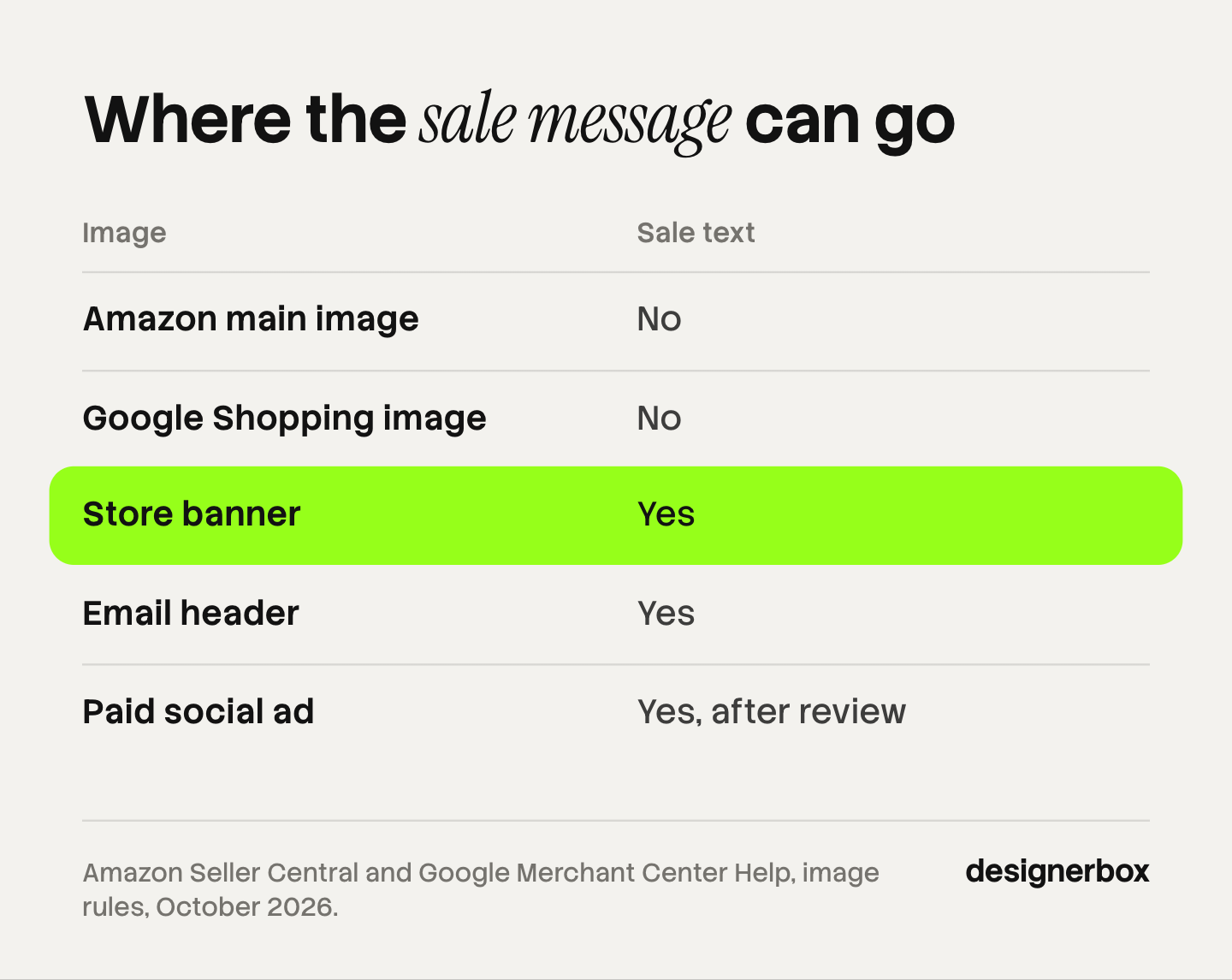
Amazon. The main image needs a pure white background, and the product fills 85% of the image. Only a limited number of product types may use a lifestyle main image, and Amazon says “with no text or extra logos”. On every image, Amazon does not accept badges that look like its own, such as “Best seller” (Amazon Seller Central, product image guide, accessed October 2026). Our guide to Amazon image requirements has the full list.
Google Shopping. Google says: “Don’t use an image that contains promotional elements or overlays.” That covers calls to action, price information, watermarks and added logos, and an image with a border (Google Merchant Center Help, image link, accessed October 2026). The same page says an image made with AI must keep the metadata that marks it as AI-generated.
The price field. Google shows the discount from your product data. You send the sale price attribute, and the sale price is shown as the current price. The original price may appear beside it. A second attribute sets the dates, so the sale price starts and ends on schedule (Google Merchant Center Help, sale price, accessed October 2026). Google notes that the sale annotation does not always appear.
Your own channels. A store banner, an email header and a paid social ad can all carry the offer. Ads go through review first. The ad plan, with sizes and launch dates, is in our guide to Black Friday Facebook ads. This article is general information, not legal advice, and each platform’s current page is the rule.
What does each product need for Black Friday?
Each promoted product needs a complete listing set first. A few hero products then need sale creative. Sort the products into those two groups before you make an image. Most products need only the listing work.

The listing set
Amazon requires one compliant main image and recommends at least six more, plus one video (Amazon Seller Central, product image guide, October 2026). Use that as the count to check each product against.
| Image | Job | Sale text |
|---|---|---|
| Main image | Shows the whole product on white | Never |
| Angles | Back, side and three-quarter views | Never |
| Detail | Material, stitching, label, finish | Never |
| Scale | The product in a hand, on a body or beside a known object | Never |
| In use | The product in a room or on a person | Never |
| Gift view | The product with its box or wrapping | Never |
The gift view is the seasonal one. On your own store it can lead the page in November. On Amazon, the main image leaves packaging out unless the packaging is a product feature, so keep the gift view as an additional image. Sizes for a Shopify store are in our guide to Shopify product image size, and scene images are covered in AI lifestyle photo generators.
The sale set
The sale set is built from approved listing images. You do not shoot it again.
- Ad images in square, vertical and story formats, with space for the offer. Layouts are in our static ad examples, and the sizes for each platform are in our guide to image ads.
- A store banner for the home page and the sale collection.
- An email header for each send.
- A collection image that shows several sale products together.
How many images does a Black Friday campaign need?
Count the two sets apart, because they grow in different ways. The listing set grows with the number of products. The sale set grows with products, times concepts, times formats. A small number of hero products can make more sale files than the whole listing set needs in new images.

Here is a worked example. It is illustrative arithmetic, not a benchmark.
- A brand promotes 30 products. At seven images each, the full listing set is 210 images. Most already exist, so the real job is the gaps.
- An audit finds 2 missing images per product on average. That is 60 new listing images.
- 6 of the 30 are hero products. Each gets 3 ad concepts in 4 formats. That is 72 sale files.
The sale set is larger than the listing gaps, and it is the set that expires on 1 December. The listing images stay useful for as long as the product is sold. If time is short, the listing gaps come first.
The count also tells you where a system helps. Sixty listing images of six types is repeat work: the same shot for each product. Our guides to the catalog photoshoot and batch photo editing cover that part. Tool choices for the campaign side are in AI tools for seasonal campaigns.
When should Black Friday images be ready?
Listing images should be live two weeks before Black Friday, and sale creative should be submitted one week before. The platforms publish their own delays. Amazon says an image “can take up to 24 hours” to appear after upload. Meta says: “Most ads are reviewed within 24 hours, although in some cases it may take longer” (Meta Business Help Center, ads in review, accessed October 2026).
A day of delay is small in October and large in the last week. A rejected main image or a disapproved ad needs a fix and a second wait. Black Friday 2026 is 27 November. This is the plan we suggest. It is a plan, not a platform rule.
| By | What is locked | Reason |
|---|---|---|
| 30 October | The promoted products and one accurate source photo of each | Every later image starts from the source photo |
| 13 November | Listing images live on the store, the marketplace and the feed | Time to fix an image a platform does not accept |
| 20 November | Sale creative submitted for ad review, email built, sale price dates set | Review can take longer than a day |
| 25 November | Freeze. Fixes only | A new upload now may not appear in time |
| 27 November | Black Friday | |
| 30 November | Cyber Monday | Remove the Black Friday wording where it is used |
Meta also says an ad may be reviewed again after it is live. Keep one approved spare for each hero product, so a paused ad has a replacement.
How do you check images before the sale?
Check every image twice: once for the product and once for the offer. A seasonal scene or a new format can change the product without anyone asking for it. The image must show the item the customer will receive. The offer on the image must match the store on the day.
The product check. Compare each image with the source photo.
- Is the color the same in every image of that variant?
- Is the label, logo and printed text correct and readable?
- Are the shape and the proportions unchanged?
- Are small parts present: buckles, caps, seams, buttons?
- Did the resize crop a part of the product?
The offer check. Do this again on 25 November.
- Does the discount in the ad match the price in the store?
- Does the end date in the email match the sale price dates?
- Is the offer readable on a phone?
- Is there any sale text on a listing image or a feed image? Remove it.
Images made or edited with AI need the first check most. Our guide to AI product photo accuracy names the errors to look for, such as warped prints and garbled logos. For the whole route from the source photo to the live listing, use the product photography checklist.
Black Friday images in DesignerBox
Anyone can make an AI picture. Making hundreds that still look like your brand is the hard part. DesignerBox is AI creative production for brands and agencies. You build a workflow once with your brand, your products and your rules, then run it on every promoted product. The cost is shown before the run.
For the listing set, a workflow makes the same shots for each product from one source photo. A batch runs that workflow over a whole sheet of products, one product per row, with the same standard on row one and row two hundred. You keep or discard each result, and you re-run one row without changing the others. Scene images for the gift view start on the page for AI product photography backgrounds, and the sheet is explained on the batch page.
For the sale set, the ads resizer makes each format from one approved ad, and the ad localizer rebuilds an ad in another language and redraws the layout. Static ads are covered by the AI ad generator. Listing images and ads come from the same brand rules, so the full workflow from the first product photo to the finished ad is in one subscription.
The limits are plain. The source photo, the choice of hero products and the final check on color and price stay with you. Three critic steps score the results and best-of-N keeps the best one, and a person still looks at every image. DesignerBox does not publish to a store or an ad account. You download the results, or send them with a webhook or an S3 step. There is a free plan, and it runs on sample products. Uploading your own photos and the commercial license start on the Pro plan. AI video, virtual try-on, upscaling, the image editor and the video editor start on the Premium plan. Every plan below Ultra is one seat. Plans and credits are on the pricing page.
Scale content without limits.
Generate content for your products or services with AI, starting today, and keep your brand on every piece. Start with the listing set for one product type, check the results, then run the sheet. Get started free
FAQ
When should I prepare product photos for Black Friday?
Start in October. Lock the promoted products and their source photos by the end of the month. Have listing images live two weeks before Black Friday, and submit sale creative one week before. Amazon can take up to 24 hours to show a new image, and ad review can take longer than a day.
Can I put a sale badge on my product images?
On your own store, yes. On Amazon and Google Shopping, no. Google does not accept product images with promotional elements or overlays, and a product with one can be disapproved. Amazon’s main image shows the product on white with no added text. Show the discount through the sale price fields.
How many product photos does a Black Friday listing need?
Check each promoted product against a set of seven: a main image and six more. Amazon requires one compliant main image and recommends at least six additional images and one video. Add a gift view for the season as an additional image.
What is the difference between Black Friday and holiday product photography?
The product images are the same. The scene and the message change. Black Friday creative carries a discount and ends in days. Holiday product photography shows the product as a gift, with seasonal props or wrapping, and runs through December. Neither changes the rules for the main listing image.
Do I need a new photoshoot for Black Friday?
Usually not. You need one accurate source photo of each promoted product. Angles, scenes, gift views and ad formats can be edited or generated from it. Reshoot only when the source photo is blurred, badly lit or shows old packaging.
Can I use AI-generated product images in a Black Friday sale?
Yes, with two checks. The image must show the real product accurately, so compare color, label and shape with the source photo. Google Merchant Center also asks that an AI-generated image keeps the metadata that marks it as AI-generated.
Can DesignerBox make Black Friday product images?
DesignerBox runs the repeat part. A workflow makes the same listing shots for each product, and a batch runs it over a whole sheet of products. You see the cost before you press Run. The ads resizer makes each ad format from one approved ad. The source photos and the final check stay with you.
Sources
- Black Friday 2025 US online spend, growth, and mobile share on Thanksgiving and Cyber Monday: Adobe, Cyber Monday 2025 release, published 2 December 2025, accessed October 2026
- Shopify merchant sales over Black Friday and Cyber Monday 2025, and the peak sales per minute: Shopify, BFCM 2025 data, published 2 December 2025, accessed October 2026
- Amazon main image rules, the recommended image count, badges and the 24-hour display time: Amazon Seller Central, product image guide, accessed October 2026
- Google product image rules on promotional elements, overlays, borders and AI metadata: Google Merchant Center Help, image link, accessed October 2026
- Google sale price and sale price effective date attributes: Google Merchant Center Help, sale price, accessed October 2026
- Meta ad review time and repeat review: Meta Business Help Center, about ads in review, accessed October 2026
- DesignerBox batch, one product per row, the same look on row one and row two hundred, re-running one row and the cost shown before the run: DesignerBox batch page (designerbox.ai/product/batch), October 2026
- DesignerBox plan gates: DesignerBox pricing page (designerbox.ai/pricing), October 2026
Adobe, Shopify, Amazon, Google and Meta facts verified on each publisher’s own page, October 2026. DesignerBox features verified on designerbox.ai, October 2026. The 210, 60 and 72 image counts are illustrative arithmetic, and the dates in the plan are a suggestion. Individual results vary.

