




TikTok Shop product videos are limited to one per listing. The Product Listing Policy caps that video at 5MB, while its Product Media Center page states 10MB and adds that the file must be MP4, shorter than 60 seconds, with an aspect ratio between 9:16 and 16:9. Both pages are TikTok’s own. Build to 5MB and you satisfy either. That cap, not the 60 seconds, decides how long your video can be.
Sellers often learn this from a failed upload. They export a 60 second clip, watch the upload fail, drag the quality slider down until it passes, and ship a video that looks like a 2013 upload sitting next to nine sharp product photos.
There is a second constraint that matters more, and it is a content one. TikTok’s own guidance tells sellers not to build a product video out of still images. This guide covers both halves: the file specs with the arithmetic that follows from them, and what TikTok says the video should contain.
Key Takeaways
- Two published caps, 5MB and 10MB. TikTok’s Product Listing Policy states sellers may upload up to 1 video per listing which must not exceed 5MB (seller-us.tiktok.com, accessed September 2026). Its Product Media Center page states a maximum size of 10MB (seller-us.tiktok.com, accessed September 2026).
- Build to 5MB. It is the stricter of the two and it satisfies both pages. This is the same pattern as TikTok’s pixel floor, which is published as both 600 x 600 and 800 x 800.
- One video per listing, MP4 only. Shorter than 60 seconds, aspect ratio between 9:16 and 16:9 (seller-us.tiktok.com, accessed September 2026).
- 5MB over 60 seconds is about 0.67 Mbps. That is unwatchable at vertical resolution, which is why long listing videos look broken.
- Six to ten seconds is the working range. At 8 seconds you get roughly 5 Mbps, which holds up at 1080 x 1920.
- TikTok tells you not to make a slideshow. Its guidance says do not use still, looping, or scrolling images through the entire video without featuring your face and the physical product (seller-us.tiktok.com, accessed September 2026).
- AI-generated voices are named in the LIVE rules. TikTok says not to use non-real-time verbal interaction such as AI-generated voices, audio recordings, or radio during LIVE (seller-us.tiktok.com, accessed September 2026).
What are the requirements for TikTok Shop product videos?
One video per listing, MP4 format only, shorter than 60 seconds, aspect ratio between 9:16 and 16:9, and a file size cap that depends on which TikTok page you read.
The Product Listing Policy, which is the policy document, says the video must not exceed 5MB. The Product Media Center help page, which is the upload tool documentation, says maximum 10MB. Both are current TikTok seller pages.
| Spec | Product Listing Policy | Product Media Center | Build to |
|---|---|---|---|
| Videos per listing | 1 | 1 | 1 |
| File size | Must not exceed 5MB | Maximum 10MB | 5MB |
| Format | Not stated | MP4 only | MP4 |
| Duration | Not stated | Shorter than 60 seconds | Under 60 seconds |
| Aspect ratio | Not stated | 9:16 to 16:9 | 9:16 |
This is not an unusual situation on TikTok Shop. The same policy publishes a 600 x 600 pixel floor for images while TikTok’s UK best-practice page publishes 800 x 800 for the same field. The rule that keeps you out of trouble is the same in both cases: build to whichever value is harder to hit.
The image half of the listing runs on its own spec set, covered in TikTok Shop product images and the square listing versus tall feed problem. How TikTok Shop differs from the Instagram and Facebook shops is in social commerce on TikTok, Instagram and Facebook.
The file cap decides your video length
The 5MB cap decides how long a TikTok Shop product video can be. File size divided by duration sets the bitrate, so a longer clip gets less data for each second.
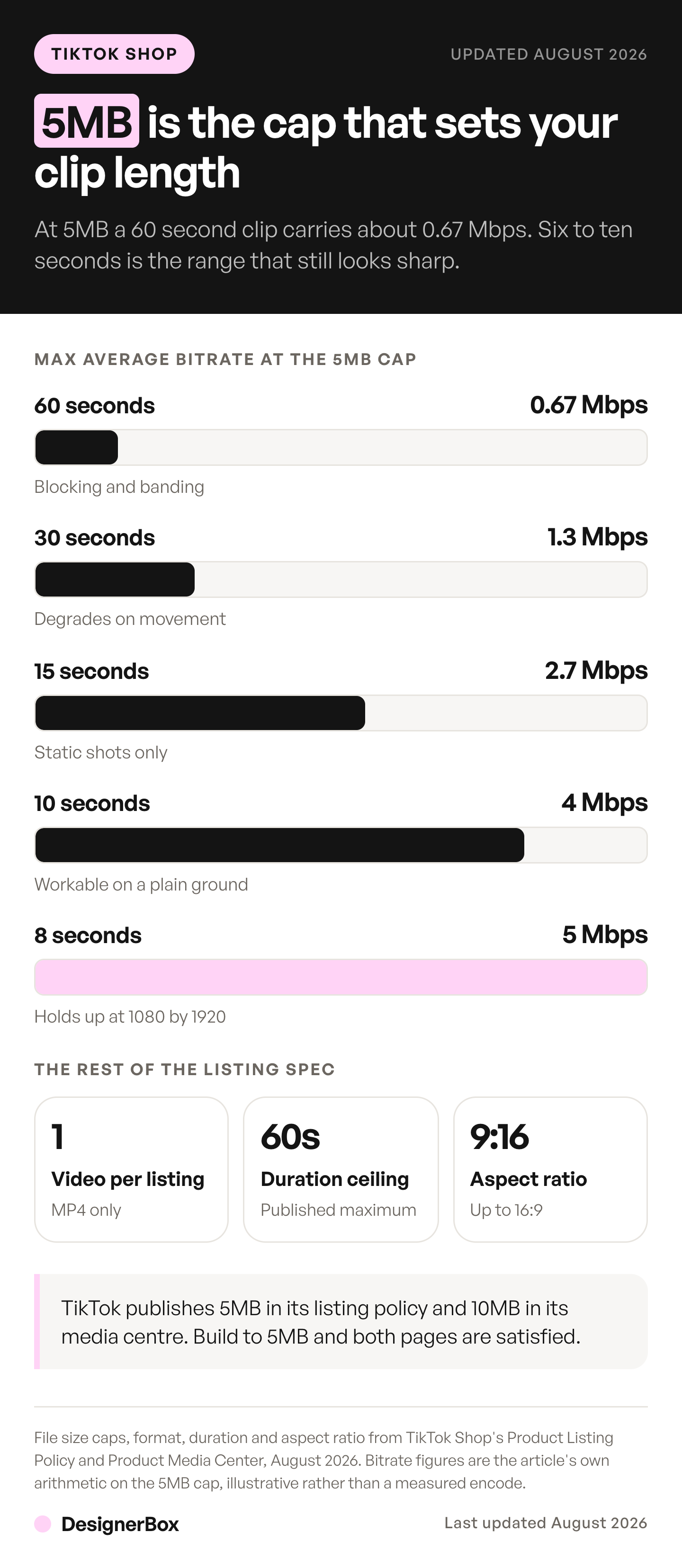
5MB is about 40 megabits. Divide by duration and you get the maximum average bitrate the file can carry:
| Duration | Max average bitrate at 5MB | What that looks like at 1080 x 1920 |
|---|---|---|
| 60 seconds | About 0.67 Mbps | Unusable. Blocking, smearing, banded gradients |
| 30 seconds | About 1.3 Mbps | Visibly degraded on any movement |
| 15 seconds | About 2.7 Mbps | Acceptable only for a static, slow shot |
| 10 seconds | About 4 Mbps | Workable on a simple product against a plain ground |
| 8 seconds | About 5 Mbps | Holds up, including moderate motion |
| 6 seconds | About 6.7 Mbps | Comfortable headroom for detail and texture |
Subtract roughly 128 kbps from each figure if the clip carries audio.
The conclusion is a production decision: build a 6 to 10 second product video. You give up nothing real. The listing video sits on a product card where a shopper is deciding whether to keep scrolling, and a tight loop of the product doing its one interesting thing beats a minute of b-roll compressed into mush.
The long version belongs somewhere else. Feed posts and paid ads run on different specs entirely, and how to create TikTok video ads with AI covers the ad build, including the dimensions and the AI disclosure toggle. Creator clips that carry a product link are a separate asset again, covered in shoppable video clips for creator programs. The creator side of TikTok Shop, with its follower rule and sample deadline, is in the TikTok Shop affiliate program.
Getting a clean file under the cap
Work backwards from 5MB rather than exporting and hoping.
- Pick the duration first. Six to ten seconds. This single decision makes everything else possible.
- Keep 1080 x 1920. Do not drop to 720 to save file size. Shorten the clip instead. Resolution loss shows on a product; two fewer seconds does not.
- Set a target bitrate, not a quality slider. For 8 seconds, target 4.5 Mbps video and 96 kbps audio. That lands near 4.6MB with margin under the cap.
- Cut the fades. Fades are gradient frames, and gradients are expensive to encode. A one second fade at each end of an eight second clip spends a quarter of your file on frames nobody watches.
- Use a plain ground. Busy backgrounds and heavy grain eat bitrate. This is the rare case where the cheaper-looking set is also the technically correct one.
- Check the file, then check the frame. Under 5MB but the product edges shimmer? Cut two seconds and re-export. Do not lower the resolution.
Step 3 is where most sellers go wrong, because quality sliders are relative and file caps are absolute. Targeting a bitrate makes the output size predictable before you render.

What TikTok says the video should contain
TikTok asks for a dynamic video that shows your face and the physical product. It also asks sellers not to build the video only from still images. The specs are the easy half. The content guidance is where AI-generated video gets sellers into trouble, and TikTok is unusually direct.
Its guidance on high-quality videos and LIVEs states three things that bear on this. Content should be dynamic, intriguing and appealing. Sellers should show their face, because that personal touch helps create a stronger connection with viewers. And sellers should not use still, looping, or scrolling images through the entire video without featuring their face and the physical product.
Read that last one twice. The default move when you have nine product photos and need a video is to pan across them with music over the top. TikTok names that exact pattern and tells you not to do it.
The LIVE rules go further: no stills, slideshows or scrolling images covering more than 50% of the screen, and no non-real-time verbal interaction such as AI-generated voices, audio recordings or radio. Those are written for LIVE sessions rather than listing videos, and they are worth knowing anyway because they tell you where the platform’s judgment sits.
Where AI fits in a TikTok Shop video
AI fits the product half of a TikTok Shop video, made from your own product photo. You supply the human half. Sellers worry that AI content on TikTok looks fake. On TikTok that worry has a published source, because the platform itself asks sellers to show their face and the physical product.
The split that survives contact with the policy:
- Use AI for the product half. Clean packshots, alternate angles, styled scenes, and the motion shot that shows the product turning, opening or pouring. It starts from your real product photograph, so what is on screen is genuinely your product. TikTok Shop says content is not restricted or penalized solely for using AI, and asks sellers to disclose content that is fully generated or heavily edited with AI (seller-us.tiktok.com, as of September 2026).
- Use yourself for the human half. Your hands, your face, your voice, unboxing it or wearing it. TikTok asks for this explicitly and no generated substitute reads better on a product card.
- Never build the whole video from stills. That is the specific pattern the guidance names.
Generating a shot of your product rotating on a plain ground is production work. Generating a person who does not exist to hold a product they never held is where a seller ends up arguing with a policy team. This is general information, not legal advice.
The same line runs through what makes UGC video quality hold up, and turning a product photo into a video ad covers the image-to-video step and the disclosure rules that come with it.
Building the clip from a photo you already have
Most TikTok Shop sellers have product photos and no video. Image to video is the shortest path, and it keeps the product accurate because the first frame is your own photograph.
A working sequence:
- Start from the best packshot you own. Sharp, well lit, product filling the frame.
- Generate one short motion clip from it. A slow rotation, a lid lifting, fabric moving. One action, not three.
- Hold it to 6 to 10 seconds. The file cap decides this, as above.
- Add one beat of real handling if you can. Even two seconds of your own hands changes how the clip reads.
- Export vertical at 1080 x 1920 and check the file size before upload.
In DesignerBox, video ad templates run this image-to-video step from your own product photo. For cutting, captions and assembly, the video editor is a real timeline, with several tracks, transitions, animated text and audio.
Model choice matters more than it looks, because holding a product’s shape through a movement is the hard part. The six rules for AI product video cover the shot list and the model for each shot. Seedance 2.0 from ByteDance is worth trying first on short product clips, and if you are weighing it against Kling from Kuaishou, the Seedance alternatives comparison covers what each model does, from each vendor’s own documentation. DesignerBox runs video models, and the model list shows them.
Cost of a listing video
Video is billed in credits, and the model you pick moves the bill more than anything else. In DesignerBox, an 8-second clip costs 40 to 560 credits, depending on the model. The cost is shown before the run, so the model is a budget decision you make up front.
Two things follow for a TikTok Shop seller. The 6 to 10 second discipline the file cap forces on you is also the cheapest way to work, which is a rare alignment of platform limit and budget. And the model you pick for a catalog matters, because the gap between models is the difference between covering every SKU and covering a handful.
AI video starts on the Premium plan. It is not available on Free, Basic or Pro. Plans and credits are on the pricing page, and what DesignerBox does for TikTok Shop sellers covers the listing workflow.
Running video across a whole catalog rather than one listing is a different budget question, and the economics of AI video at volume works through it.
Set the clip up once, and the next listing is a repeat. Fix the motion, the duration, the ground and the export target on one SKU, and save that as a workflow. A saved workflow runs the same way on the next product, so each new listing gets the same length and stays under the same cap. You set the brand once, and the workflow reads it on every run. The fortieth listing video then looks like the first. Batch runs one workflow over a whole sheet of products. The templates, the workflows, batch and the video editor are all part of DesignerBox. The full workflow from the first product photo to the finished ad, in one subscription.
Start from a template, add your brand and your products, and run it. See the templates.
FAQ
What are the TikTok Shop product video requirements?
One video per listing, MP4 only, shorter than 60 seconds, aspect ratio between 9:16 and 16:9. On file size TikTok publishes two figures: its Product Listing Policy says the video must not exceed 5MB, and its Product Media Center page says maximum 10MB. Build to 5MB and both are satisfied. TikTok’s quality guidance also asks for a dynamic video that shows your face and the physical product, not a slideshow of still images.
Is the TikTok Shop video limit 5MB or 10MB?
Both numbers appear on TikTok’s own seller pages. The Product Listing Policy, which is the policy document, states 5MB. The Product Media Center help page states 10MB. Treat 5MB as the working cap, because a file that clears the stricter page clears both.
Why does my TikTok Shop video keep failing to upload?
Almost always the file size. A 60 second clip at usable quality is several times the cap. Cut the duration to 6 to 10 seconds rather than lowering the resolution, and set an explicit target bitrate rather than using a quality slider.
Is there a length requirement for TikTok Shop product videos?
Yes. TikTok’s Product Media Center says a listing video must be shorter than 60 seconds. The 5MB cap sets a tighter working limit. At 5MB, a 60 second video can carry only about 0.67 Mbps, which is unusable at vertical resolution. Six to ten seconds is the working range. A short clip at full quality beats a long one that had to be crushed to fit.
Can I use AI-generated video on TikTok Shop?
Yes, with a caveat that comes from TikTok itself. TikTok Shop says content is not restricted or penalized solely for using AI, and it asks sellers to disclose content that is fully generated or heavily edited with AI, as of September 2026. Its quality guidance also says not to use still, looping or scrolling images through the entire video without featuring your face and the physical product, and it recommends showing your face. Motion made from your own product photo fits that guidance. A whole video built from generated stills is the pattern the guidance names.
Does TikTok allow AI voiceovers?
TikTok names AI-generated voices in its LIVE rules, saying not to use non-real-time verbal interaction such as AI-generated voices, audio recordings or radio. That is written for LIVE sessions. Check the current policy before applying it to a listing video, because the two surfaces are documented separately.
What aspect ratio is best for a TikTok Shop product video?
9:16. The accepted range runs from 9:16 to 16:9, but the product card and the feed are both vertical surfaces, so a vertical clip uses the full space while a horizontal one is letterboxed into a strip.
Sources
- TikTok Shop Academy, Product Listing Policy: seller-us.tiktok.com (accessed September 2026)
- TikTok Shop Academy, using Product Media Center to upload images faster: seller-us.tiktok.com (accessed September 2026)
- TikTok Shop Academy, requirements for high-quality videos and LIVEs: seller-us.tiktok.com (accessed September 2026)
- TikTok Shop Academy, AI-generated content guidance: seller-us.tiktok.com (accessed September 2026)
- DesignerBox plans and the video cost range: DesignerBox pricing page (designerbox.ai/pricing), September 2026
TikTok Shop specifications and content guidance verified against TikTok’s own seller documentation as of September 2026. TikTok publishes different seller pages per region and updates them without notice, and the two file-size figures above are both live, so confirm against your own Seller Center before a bulk upload. Bitrate figures are calculated from the 5MB cap. Individual results vary.


