Amazon video requirements depend on the slot. Amazon takes video in four places, and each sets its own length rule. Sponsored Brands runs 6 to 45 seconds, Sponsored Products starts at 7 seconds, and the shoppable video on your detail page must run 1 to 12 minutes. Most AI video models generate 15 seconds or less per pass, so one pass clears the ad slots and misses the listing slot.
That gap is why a search for “Amazon product video specs” returns contradictory answers, depending on which page you open. One guide says 15 to 30 seconds. Another says under two minutes. Amazon’s own seller documentation says one to twelve. All three can be quoted accurately, because they are describing different slots.
This guide separates them. Each slot gets its own spec, cited to the Amazon page that publishes it, plus a clear verdict on whether a generated clip fits there as it is or needs assembly work first.
Key Takeaways
- Amazon says detail pages saw an average 24% increase in sales after their first shoppable video, against pages without one (sell.amazon.com, October 2026). That lift sits behind the one slot a single generation cannot fill.
- There is no single Amazon video spec. Shoppable listing video, Sponsored Brands, Sponsored Products, and A+ Content each publish their own rules on separate Amazon pages.
- Ad slots fit AI output natively. Sponsored Brands accepts 6 to 45 seconds and Sponsored Products starts at 7 seconds (advertising.amazon.com, September 2026). One generation clears both.
- The listing slot does not. Amazon requires shoppable videos to run between 1 and 12 minutes (sell.amazon.com, September 2026). At 8 seconds per generation, the 60-second floor is eight clips plus an edit.
- Generated people need a metadata tag. If a photorealistic person in your video was generated entirely by AI, Amazon requires the keyword contains-synthetic-performer in the file’s XMP dc:subject field before upload (sellercentral.amazon.com, September 2026). Product-only clips are exempt.
Why “Amazon video specs” returns four different answers
Amazon built these placements at different times, for different teams, documented on different domains. Seller-facing listing video lives on sell.amazon.com. The ad formats live on advertising.amazon.com. A+ Content sits behind Brand Registry in Seller Central.
No Amazon page combines the four slots in one table. A seller reads a 15 to 30 second figure and uploads a 20-second clip to the listing slot. Amazon rejects it, because that slot has a 60-second floor.
The fix is to name the slot before you name the spec. Every number below is tied to the Amazon page that publishes it.
Amazon video requirements for each slot
Amazon video requirements differ by slot. The shoppable listing video runs 1 to 12 minutes, the two ad slots run in seconds, and A+ Content video caps at 180 seconds.
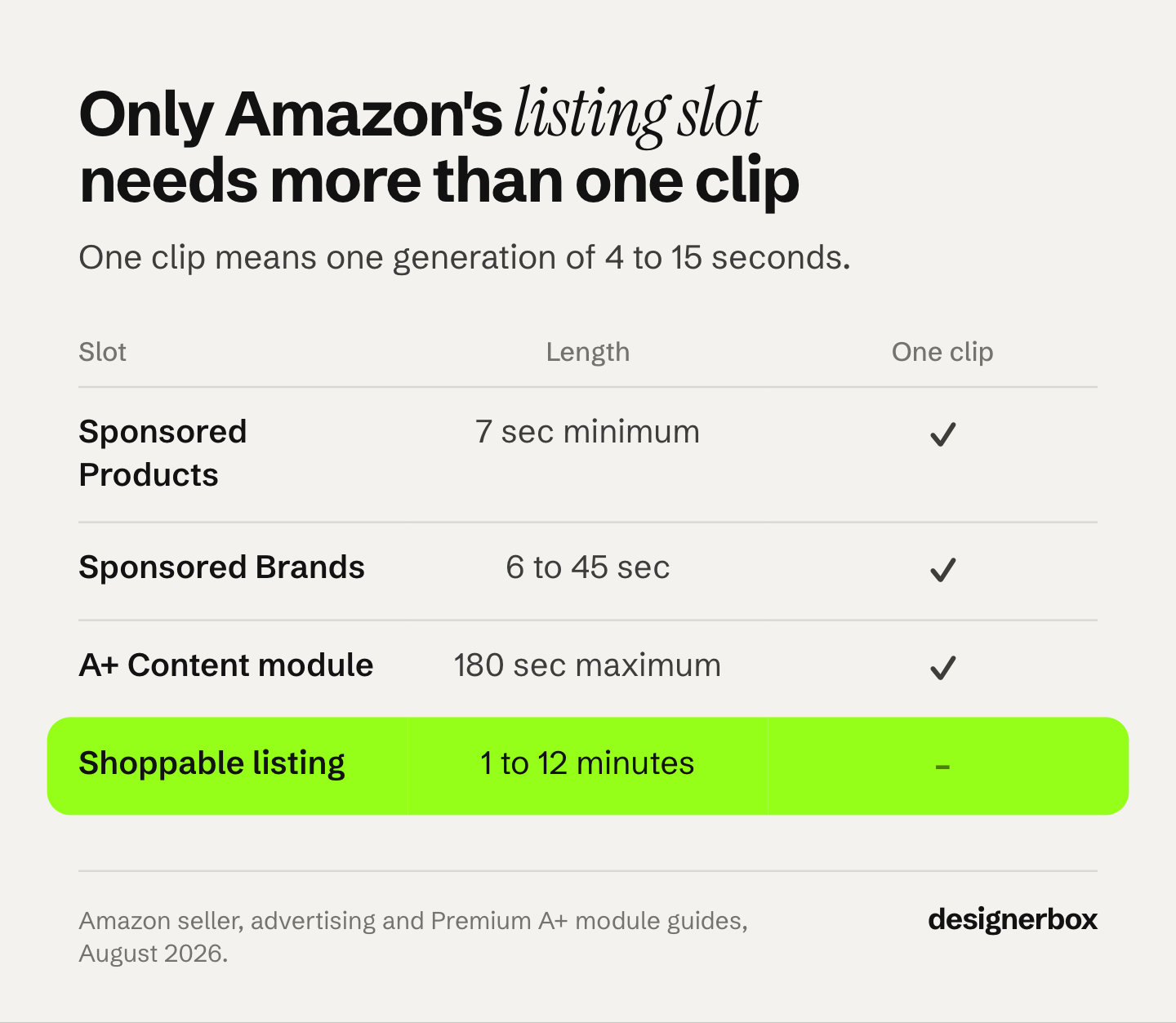
| Slot | Length | Aspect | Max size | Eligibility |
|---|---|---|---|---|
| Shoppable listing video | 1 to 12 minutes | 16:9 or 9:16 | 5 GB, up to 1080p | Professional account, 3 months selling history, live listings |
| Sponsored Brands video | 6 to 45 seconds, 20s or less recommended | 16:9 | 500 MB | Brand Registry for sellers |
| Sponsored Products video | 7 seconds minimum | 16:9 (Amazon lists 9:16 as coming in 2026) | 500 MB | Standard ad eligibility, 1 to 5 videos per ASIN |
| A+ Content video module | Up to 180 seconds | Not published | 200 MB, .mp4 only | Premium A+ only, Professional account, Brand Registry or generic products |
Sources: sell.amazon.com, advertising.amazon.com, advertising.amazon.com, sell.amazon.com. All accessed September 2026.
Four details in that table need a closer look.
Sponsored Brands aspect ratio only looks contradictory until you check the landing page. The ad specs page states 16:9 only. Amazon’s getting-started guide for the same format says it supports vertical 9:16 or horizontal 16:9. Both are accurate. Vertical exists, and Amazon’s February 2024 launch note gates it: “Vertical video creatives is not available for Product detail page as landing page” (advertising.amazon.com, September 2026). Build 16:9 for any campaign pointing at a detail page, and keep 9:16 for Store landing pages.
Sponsored Products video files are capped at 500 MB, not 5 GB. For the same clip and codec, the listing slot allows ten times the file size. Export settings that pass on a detail page will fail on an ad.
A+ Content video caps at 180 seconds and 200 MB, and it is a Premium A+ feature. Amazon’s Premium A+ Module Guide sets the same 180-second maximum across all three video modules, in .mp4 only (m.media-amazon.com, September 2026). The file cap is the trap. 200 MB is a twenty-fifth of the listing slot’s 5 GB, so an export that passed on your detail page will fail here. Basic A+ has no video module at all. The same guide states that Premium A+ video does not play on mobile, where the module shows desktop image assets instead. We did not find the “15 to 60 seconds” A+ spec that circulates on agency blogs on any Amazon page we checked.
The “15 to 30 seconds” figure belongs to a different slot. Amazon does publish it, under a heading reading “Aim for 15-30 seconds” in its guide to optimizing Sponsored Brands video ads (advertising.amazon.com, September 2026). It is ad guidance. Moved onto the listing slot, it sits below Amazon’s own one-minute floor and fails on upload. Amazon’s listing-page advice is that most successful videos run 30 to 90 seconds (sell.amazon.com, September 2026), which also starts below its own floor. Build to the spec block, because that is what the upload validator reads.
What Amazon says a listing video is worth
Amazon publishes its own lift figures here, with footnotes.

Amazon’s seller blog says detail pages saw an average 24% increase in sales after their first shoppable video was added, against pages without one (sell.amazon.com, October 2026). The footnote is Amazon internal data from January to June 2026. An older Amazon guide gave 23.8% on US data from January to June 2024. The same guide reports video cutting returns by more than 40%, on worldwide data from 2022 (m.media-amazon.com, October 2026). Those are separate studies. The lift is also not even across categories.
| Category | Average sales lift with video |
|---|---|
| Toys | 32.7% |
| Apparel | 30.5% |
| Home | 26.7% |
| Beauty | 25.8% |
| All categories | 24% |
Source: sell.amazon.com, October 2026.
Keep three caveats in mind before you budget against that number. It is Amazon’s own figure for Amazon’s own feature, from Amazon’s internal data. It compares pages that have a video to pages that do not, which is not the same as comparing a good video to a bad one. And sellers who invest in video also invest in titles, images, ads and price, none of which Amazon controls for. Read it as the size of the opportunity, not as a number your clip inherits on upload. For more on what a listing video adds to sales, see the evidence on product video conversion.
The awkward part is where the lift sits. All of it belongs to the shoppable listing slot, which is the one slot on this page a single generation cannot fill. The 24% is behind a 60-second floor.
Where a generated clip is the finished deliverable
Most current video models generate 15 seconds or less per pass. Seedance 2.0 runs any whole number of seconds from 4 to 15 (docs.byteplus.com, September 2026), and Kling 3.0 runs 3 to 15 seconds (kling.ai, September 2026). Seedance 2.5, which ByteDance launched on 31 July 2026, reaches 30 seconds (seed.bytedance.com, September 2026). That range maps cleanly onto both ad slots.
A 15-second Sponsored Brands video sits inside the 6 to 45 second window and matches Amazon’s own recommendation of 20 seconds or less. A 10-second Sponsored Products video clears the 7-second minimum with room to spare. Neither needs an editor, a timeline, or a second generation.
The ad placements carry the spend, and a single AI clip is a complete answer there. If you are choosing between models for those slots, six models compared on ecommerce output covers which handles product motion cleanly. Apparel and supplement sellers work from a narrower shortlist, sorted by job in the video tools built for activewear and fitness SKUs.
One Sponsored Products rule shapes the shot before you generate it: the product must occupy 50% or more of the video frame (advertising.amazon.com, September 2026). Write that into the prompt as a tight or medium shot. A wide lifestyle scene with the product small in frame risks rejection, however good it looks.
Why the listing slot needs eight clips, not one
Amazon’s shoppable video floor is 60 seconds. A single generation runs for seconds, not minutes.
At 8 seconds per pass, a compliant 60-second listing video is eight generations. They have to join cleanly, show the same product in every one, and still work when watched in order. That is an editing job with a generation step inside it.
The practical build is a mix. Generate the b-roll that is expensive to shoot, which is camera moves around the product, texture close-ups, and scene changes. Fill the rest with stills you already own, text cards, and any real footage you have. The runtime target is the constraint, and stills on screen count toward it.
The hardest step is to hold one product steady across eight separate generations. Keeping characters and products consistent across AI video covers the reference-image approach that makes shot two look like shot one.
The audio Amazon deletes
Sponsored Products video does not permit audio. Amazon states it will be removed (advertising.amazon.com, October 2026).
So for this slot, you choose the model on picture alone. Several models in the DesignerBox catalog generate sound with the picture, and the model tier is what moves the cost. No model tier buys a soundtrack this slot will keep.
Any soundtrack you generate for a Sponsored Products video is stripped before a single shopper sees it. Generate silent, spend the difference on more variants, and put the captions on screen where the format expects them.
Amazon is not alone in this. Etsy removes the audio from listing videos, so the same silent-model rule applies to Etsy listing videos with AI, on a much shorter 15-second ceiling.
The same logic applies more loosely to Sponsored Brands, which does accept audio but plays muted by default with a mute toggle in the lower right. Amazon’s spec page warns against putting text in that corner. Audio there is a real option. Your on-screen text still carries the message.
Credits for each slot
Length and model choice drive the cost. In DesignerBox, an 8-second clip costs 40 to 560 credits, depending on the model, and the cost of each run is shown before you start it.
| Slot | Target length | Runs in DesignerBox |
|---|---|---|
| Sponsored Products | 7 seconds | One run |
| Sponsored Brands | 15 seconds | One run on a model that reaches 15 seconds |
| Shoppable listing video | 60 seconds | Several runs, then an edit |
The ad slots need one clip each. The listing slot needs several clips, so the model you pick for it matters most. A lower-cost model leaves room for more shots, and a higher-tier model uses more of the month on each one. How video credits work covers the rest.
Uploading your own photos and the commercial license start on the Pro plan. AI video, virtual try-on, upscaling, the image editor and the video editor start on the Premium plan. Plans and credits are on the pricing page.
How to make an Amazon listing video with AI
- Name the slot first. Sponsored Brands, Sponsored Products, shoppable listing video, or A+ Content. Everything downstream changes with this answer.
- Check your image count if the target is the listing slot. Shoppable video only reaches the main media block when the product has fewer than six images (sell.amazon.com, September 2026). Your sixth photo and your video compete for the same position, a trade covered in what makes PDP images convert. For how the image slots are best spent, see what each marketplace shows for product listing images.
- Start from your real product photo. Every generation should start from the actual packshot, so the model works from your real product. Text-to-video from a description tends to produce something that resembles your category rather than your SKU.
- Generate to the slot’s length. One pass for either ad slot. For the listing slot, build a shot list first and generate each shot separately, the two-hop pipeline in turning one product photo into a video ad.
- Match the frame rules. Product at 50% or more of frame for Sponsored Products. Nothing important in the lower right corner for Sponsored Brands.
- Export to spec. MP4 or MOV for the listing and ad slots, MP4 only for A+. 500 MB ceiling for both ad slots, 5 GB for listing video, 200 MB for A+.
In DesignerBox, the steps above start from one product photo. A video ad template takes the still plus the shot brief, and you pick the model for each shot from the model list. For the still images beside the video, the Amazon listing images page shows the main image, the lifestyle shots and the detail pictures.
How to add a video to an Amazon listing
From the main menu in Seller Central, select Catalog, then Upload and Manage Videos. Upload the file, give it a title, and attach the ASINs it applies to. Eligibility is a Professional selling account, three months of selling history, and live listings.
Initial review runs 1 to 7 business days, then publication follows within about three days of approval (sellercentral.amazon.com, September 2026). Bulk upload takes up to 15 videos at once, and each video has to be attached to at least one ASIN. You can put up to four shoppable videos on a single ASIN.
Most “I uploaded it and nothing happened” cases are one of two things. The first is the image-count rule above. The second is review time: a video still in review can look like a rejection.
Outside Amazon, “shoppable video” also means a short creator clip with a shopping link. Our guide to shoppable video clips for LTK and Mavely creators covers that use. Creators with an Amazon storefront follow a different set of video rules, set out in how the Amazon Influencer Program works.
The tag Amazon requires on AI-generated people
If your video features a photorealistic person who was generated entirely by AI, Amazon requires you to tag the file before you upload it. This is a metadata requirement rather than a checkbox in the upload flow.
Add the keyword contains-synthetic-performer to the XMP dc:subject field of the file, as an rdf:li inside the dc:subject rdf:Bag (sellercentral.amazon.com, September 2026). Amazon documents three ways to do it: the Keywords pane in Preview on macOS, the Tags field in Windows File Explorer, and exiftool on the command line. On Windows, use the Tags field and leave Subject alone, because the two write to different metadata locations.
When the tag is present, Amazon adds its own on-screen disclosure for audiences in jurisdictions that require one (sellercentral.amazon.com, September 2026). This is general information, not legal advice.
The scope is narrower than it first reads. Amazon asks for the tag when the people in the video were generated entirely and are not based on a real person. It says not to tag video that features real people even where AI tools altered them, video with no people in it, or video whose people are not photorealistic.
So a product-only clip, which is most of what a listing needs, does not carry the tag. The tag applies as soon as a generated model enters the frame. That is what an on-model or try-on shot is, and putting clothes on a model with AI covers it.
What this does not solve
Assembly is still editing work. Generating eight clips does not produce a 60-second video. Sequencing, pacing, and cutting are a separate skill, and no generation step replaces it.
Moderation is a real gate. Amazon rejects video for low quality and for breaking its content guidelines, and rejection costs days rather than credits. Read the text on a phone screen before uploading.
A+ Content still needs Brand Registry unless your products are generic. Brand Registry needs an active registered trademark or a pending application (sell.amazon.com, September 2026). Generated video does not change that requirement.
Video does not fix the listing text. Amazon’s five bullets can be a few hundred characters each, and they follow rules your own site does not. Writing the listing version separately explains those rules.
Check which slot a cost figure covers. A monthly price for Amazon video may clear one slot and not the others. Affordable AI video for product listings compares what short AI video costs across platforms.

The real job is the whole catalog. Once the shot list, model, framing and export settings are right for one product, save that as a workflow in DesignerBox. A saved workflow runs the same way on the next ASIN, so each listing video starts from the same spec. You set the brand once, and the workflow reads it on every run. ASIN forty then looks like ASIN one. Batch runs one workflow over a whole sheet of products.
The full workflow from the first product photo to the finished ad, in one subscription. The clip, the A+ module images, the brand rules and the edit sit in one place, so you do not need three tools to finish one listing. A product video template covers the clip, and an A+ content app builds the module images that sit under it.
Start from a template, add your brand and your product, and run it.
FAQ
What are the Amazon product video requirements?
They depend on the slot. Shoppable listing video runs between 1 and 12 minutes in .mov or .mp4, up to 5 GB and 1080p (sell.amazon.com, September 2026). Sponsored Brands video runs 6 to 45 seconds, 16:9, up to 500 MB. Sponsored Products video needs a 7 second minimum with the product filling at least half the frame (advertising.amazon.com, September 2026).
Can I make Amazon product listing videos with AI?
For the ad slots, yes, in a single generation. Sponsored Brands accepts 6 to 45 seconds and Sponsored Products starts at 7 seconds, both inside what current models produce in one pass. For the shoppable listing slot, AI supplies the b-roll and you assemble the runtime, because the 60-second floor is roughly eight generations.
How long should an Amazon product video be?
Amazon recommends 20 seconds or less for Sponsored Brands video (advertising.amazon.com, September 2026). For the shoppable listing slot, the compliant range is 1 to 12 minutes and the practical target is the low end of it, since you are building that runtime rather than generating it. The 15 to 30 second figure that circulates as an Amazon requirement is Amazon’s advice for Sponsored Brands ads, so do not apply it to the listing slot.
Do I need Brand Registry to add video to an Amazon listing?
Not for shoppable listing video. Amazon states that both brand registered and non-brand registered sellers can add shoppable videos with a Professional selling account, at least three months of selling history, and live listings (sell.amazon.com, September 2026). A+ Content video modules are the piece that requires Brand Registry, or generic products.
Why did my Amazon listing video not appear on the detail page?
The most common cause is image count. Amazon’s seller blog says shoppable video only appears in the main media block when the product has fewer than six images (sell.amazon.com, September 2026), while its Seller Central help page scopes that suppression to softlines products on desktop (sellercentral.amazon.com, September 2026). Removing the sixth image frees the slot. Timing is the other cause: review takes 1 to 7 business days, publication follows within about three days of approval, and holiday seasons can take longer.
What does an Amazon listing video cost to generate?
The model and the slot set the cost. In DesignerBox, an 8-second clip costs 40 to 560 credits, depending on the model. A Sponsored Products or Sponsored Brands video is one run, and a 60-second listing video is several runs plus an edit. You see the cost of each run before you start it. AI video starts on the Premium plan (DesignerBox pricing, September 2026).
Do I have to disclose AI-generated video on an Amazon listing?
Amazon asks for a tag when the video contains a photorealistic person generated entirely by AI. Amazon then requires the keyword contains-synthetic-performer in the file’s XMP dc:subject field before you upload, and it adds its own viewer-facing disclosure where a jurisdiction requires one (sellercentral.amazon.com, September 2026). Amazon does not want the tag on video with no people, video with real people, or video whose people are not photorealistic. Other laws can apply where the ad runs.
Sources
All accessed September 2026.
- Shoppable listing video technical spec (format, 5 GB ceiling, 1080p, 16:9 or 9:16, 1 to 12 minutes), the softlines desktop scoping of the image-count rule, 1 to 7 business day initial review, 15-video bulk upload, and the AI-generated people disclosure requirement: (sellercentral.amazon.com, September 2026)
- The contains-synthetic-performer XMP dc:subject tagging procedure for macOS, Windows and exiftool: (sellercentral.amazon.com, September 2026)
- Seller eligibility, the fewer-than-six-images rule as stated on the seller blog, approval timing, the 30-to-90-second recommendation, and the 24% and category sales lifts (Amazon internal data, January to June 2026): (sell.amazon.com, October 2026)
- The older 23.8% sales lift (US data, January to June 2024) and the greater-than-40% returns reduction (worldwide data, 2022): (m.media-amazon.com, October 2026)
- Sponsored Brands video length window, 20-second recommendation, 16:9 aspect ratio, 500 MB cap and the lower-right corner warning: (advertising.amazon.com, September 2026)
- The “aim for 15-30 seconds” recommendation, published for Sponsored Brands ads: (advertising.amazon.com, September 2026)
- Vertical 9:16 Sponsored Brands creatives being unavailable when the landing page is a product detail page: (advertising.amazon.com, September 2026)
- Sponsored Products video 7-second minimum, the 50%-of-frame product rule, videos per ASIN and the audio-not-permitted rule: (advertising.amazon.com, September 2026)
- A+ Content video 180-second and 200 MB module limits, the .mp4-only format, and the mobile fallback: (m.media-amazon.com, September 2026)
- A+ Content eligibility, including the generic-products alternative to Brand Registry: (sell.amazon.com, September 2026)
- Brand Registry trademark requirements: (sell.amazon.com, September 2026)
- Seedance 2.0 durations of 4 to 15 seconds: (docs.byteplus.com, September 2026). Kling 3.0 durations of 3 to 15 seconds: (kling.ai, September 2026). Seedance 2.5 launch and 30-second ceiling: (seed.bytedance.com, September 2026)
- DesignerBox plan gates and the video cost range: DesignerBox pricing page (designerbox.ai/pricing), September 2026
Amazon video specifications re-verified against Amazon-published seller, Seller Central help and advertiser documentation in September 2026. Where Amazon’s own pages disagree, both readings are given above rather than reconciled. Amazon’s sales lift and returns figures come from Amazon’s internal data and compare pages with and without video. They are reported here as Amazon states them. The seller blog’s sales lift figure and Amazon’s shoppable video guide were re-checked on 2 October 2026. Model clip lengths verified against vendor documentation, September 2026. DesignerBox plan gates from the DesignerBox pricing page, September 2026.