 Seasonal styled set

Christmas holiday product photography, ready months early

Upload one photo of your product and get it back on a holiday set: pine sprigs, matte baubles, kraft paper or deep velvet, with warm string light bokeh behind. Every frame is graded warm for December. Save the setup and rerun it for the whole catalogue.

Start free
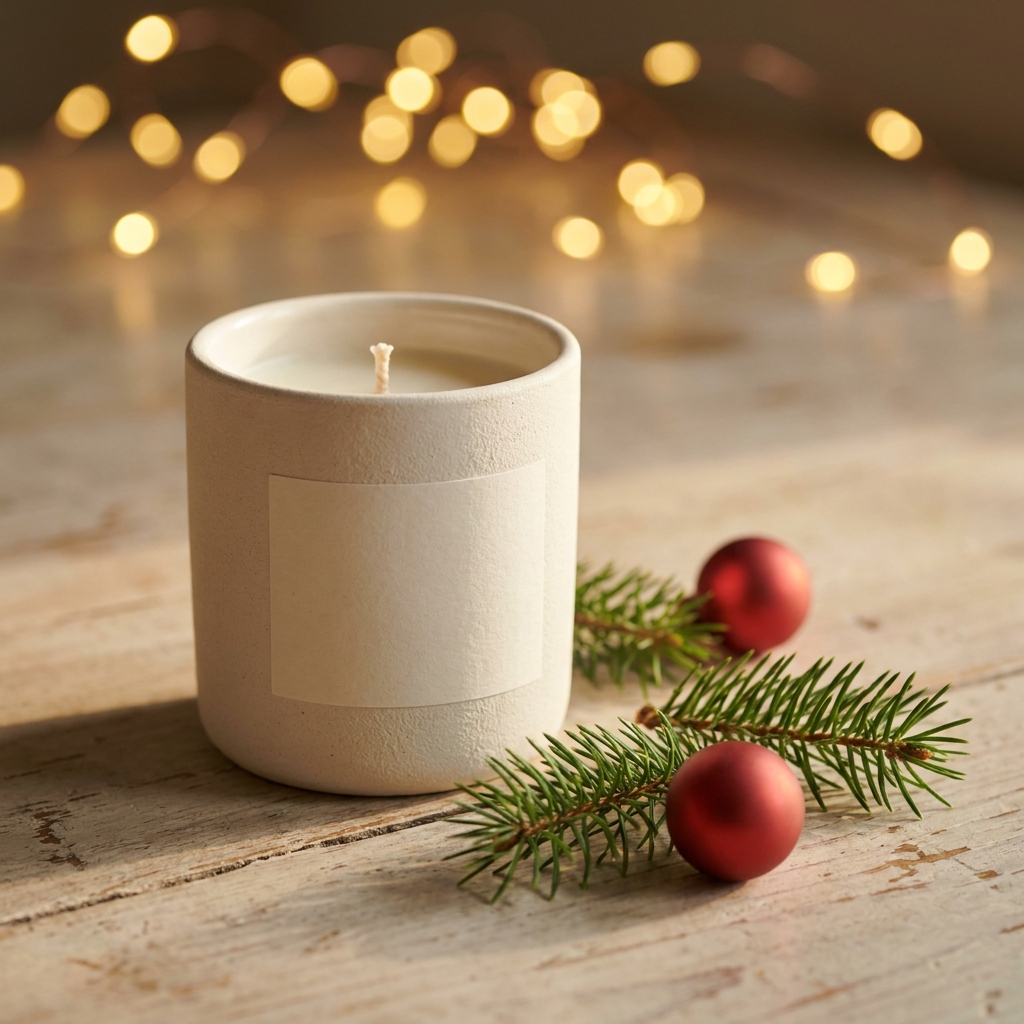
Ceramic candle vessel on a pale wooden table with pine sprigs, two matte red baubles and warm string light bokeh behind
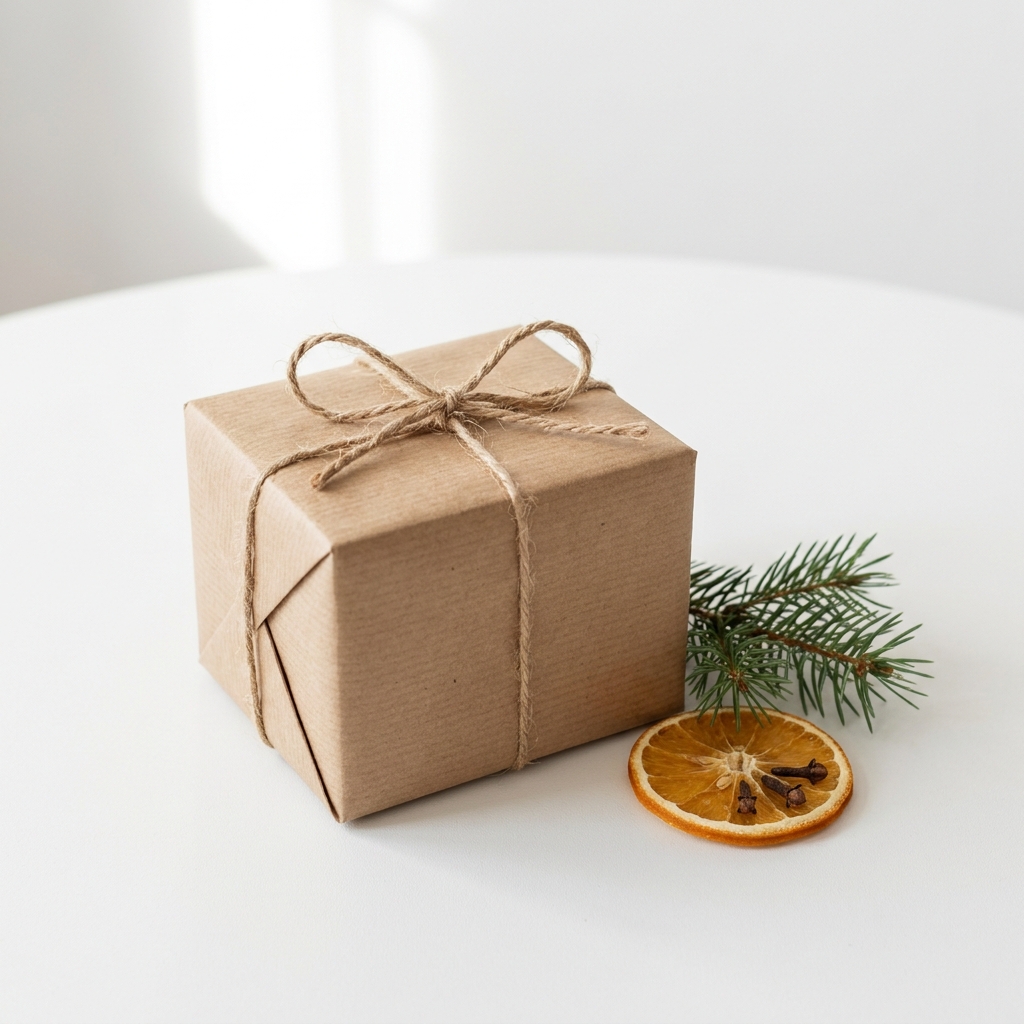
Kraft paper gift box tied with natural twine on white, a pine sprig and a dried orange slice beside it
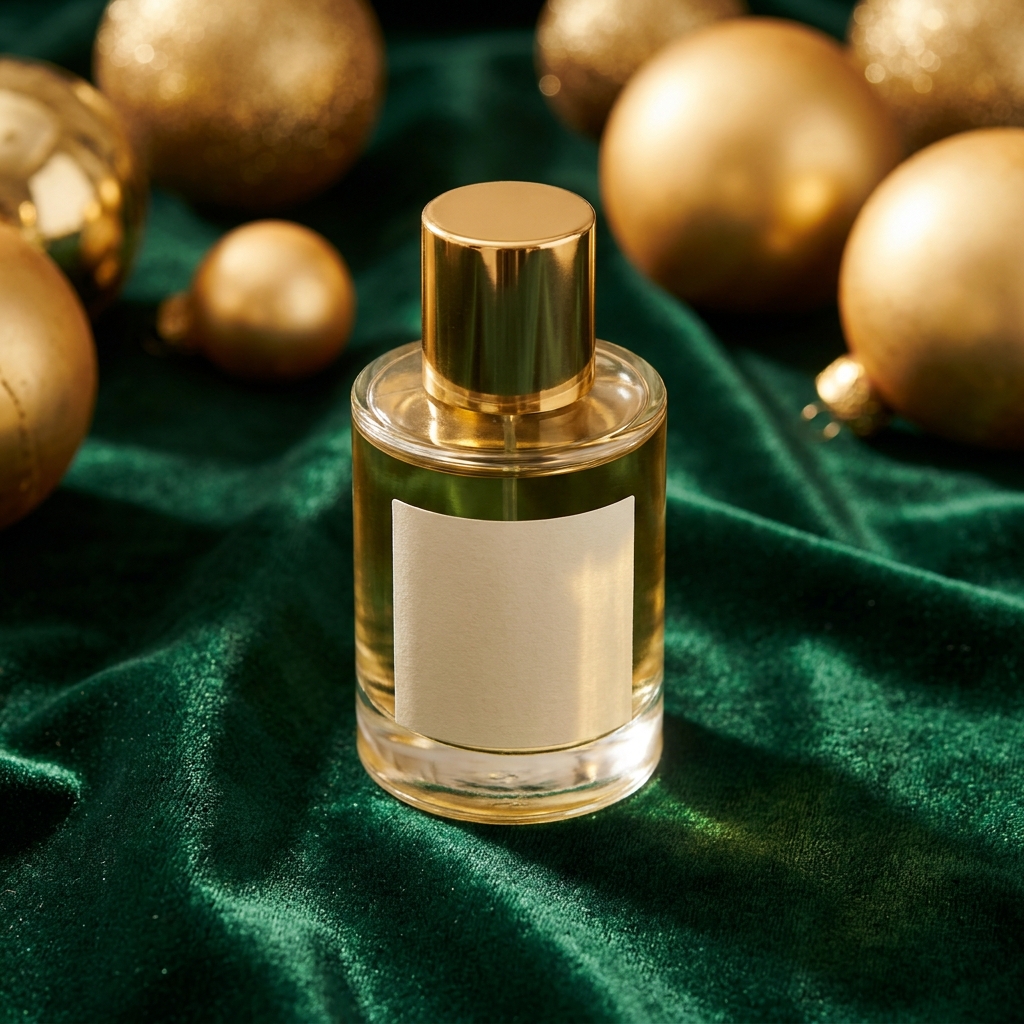
Glass fragrance bottle with a gold cap standing on deep green velvet, gold baubles softly out of focus behind

Christmas holiday product photography places a product in a seasonal set of pine, baubles, kraft paper and velvet, and it suits gifts such as candles, fragrance, jewellery and chocolate. Two things define it. The first is colour temperature. The whole set is graded nearer 3200K than 5600K daylight, so the product reads as though it stands under indoor lights in December, and every white label shifts a little towards cream. The second is depth. String lights only open into soft circles when they sit well behind the product, so the set needs room behind the subject. Both are worth the trouble for about six weeks a year, from early November to Christmas Eve. That short window is the real planning problem. A pine sprig behind a product in March reads as old stock, so the images have to be made in August or September, used hard, then stored until next autumn.

Craft problems in a seasonal set

Four things that decide whether a Christmas frame sells the gift or buries it.

Props that bury the product

Seasonal props multiply. One pine sprig becomes three, then two baubles, then a candy cane, and the product is now one object among eight. Set a hard limit of two prop groups: one behind the product, one beside its base. Then test the frame. Cover the product with your thumb. If what remains still looks like a finished picture, remove props until it does not.

String lights need distance

String light bokeh only works with distance. At 300mm behind the product the bulbs stay sharp and look like dots. Push them to 1.5 metres or more and they open into soft round circles. Lens choice matters too. An 85mm to 100mm look at about f/2.8 gives clean discs and a shallow depth. A 35mm look keeps the whole room sharp, and the effect disappears.

Warm light shifts product colour

The whole set is graded warm, nearer 3200K than 5600K daylight. Warm light pushes white labels towards cream and turns cool greys slightly brown. On kraft paper, wood and gold that looks right. On a product sold on its colour, such as a mint green jar or a pale blue tin, it is a problem. Keep one plain white version of the same product beside the holiday frame so the buyer can check the real colour.

A set with a six week life

This set sells from early November to about 24 December. That is roughly six weeks of use per year. You only get value from the work inside that window, so build the set in August or September while there is still time to fix mistakes. Save the exact prompt, model and ratio. Next year you rerun the same setup on new products instead of rebuilding the look from memory.

Tools for a seasonal set

Four apps that handle pine, bokeh, kraft paper and the gifting message.

Pine, velvet and bokeh
Styled Scene Generator

Pine, velvet and bokeh

Styled Scene Generator places your uploaded product into the set you describe, so you write pale wood table, one pine sprig, two matte red baubles, string lights two metres behind, and get that frame back. Name the distance to the lights inside the prompt. Without it the model puts the bulbs close to the product and they come back as hard dots instead of soft circles.

Open the tool

Holiday ad with price room - Before
Before
Holiday ad with price room - After
After
Product Ad Generator

Holiday ad with price room

Product Ad Generator puts the finished holiday frame into an ad layout with space for a headline and a price, so a December offer has somewhere to sit. Choose a frame where the darker area is on one side, usually the velvet or the bokeh. Kraft paper and pine leave text with almost no contrast, and a delivery date printed on kraft is hard to read on a phone.

Open the tool
Feed posts for December
Social Media Ad Studio

Feed posts for December

Social Media Ad Studio builds the paid and organic sizes from one holiday frame, so the same candle set fills a square feed post, a vertical story and a wide banner. Crop is the risk here. String light bokeh usually sits in the top third of a wide frame and vanishes in a vertical crop, so ask for the vertical version with the lights placed lower.

Open the tool
Overhead kraft and twine - Before
Before
Overhead kraft and twine - After
After
Flat Lay Studio

Overhead kraft and twine

Flat Lay Studio builds the overhead arrangement, so a gift box, twine, a pine sprig and a dried orange slice lie flat on paper under even light. Shooting from above removes the bokeh option, because there is no depth behind the product from that angle. Use flat lay for the wrapping and gifting story, and keep the string lights for side-on frames.

Open the tool

Each before and after above demonstrates the tool named on the card, using that app's own sample image, so the subject you see may not be from this industry. Run the same tool on your own photos to see it on your work.

Build order for the holiday set

Four steps from one product photo to a reusable December set.

1
Remove the background first
Uploading your own product photo is on Pro and above. Run Background Remover on it and keep both files, the white one and the transparent one. The holiday set adds warm light later. A product photographed under cool shop lighting will not match it, so choose the flattest, most even photo you have, not the most dramatic one.
2
Describe the set, not the mood
Open Styled Scene Generator and name four things: the surface, the prop behind, the prop beside, and the distance to the string lights. For example: pale oak table, one pine sprig, two matte red baubles, string lights two metres behind. Add a colour temperature. Warm indoor light near 3200K keeps the pine green instead of yellow.
3
Reduce the prop count
Look at the first frames and count every object that is not the product. If there are more than four, remove one prop group and run the app again. A run costs 4 to 10 credits and a credit costs about one cent, so three passes on one product still cost under a dollar in credits.
4
Save it as a workflow
Before you save anything, check the two things this set gets wrong. Look at the bokeh circles nearest the frame edge and confirm they are still round rather than stretched into ovals. Then hold the frame beside the plain white version and confirm the warm grade has not turned a white label cream or a grey lid brown. Once both pass, save the prompt, model and ratio in Workflows and write the year on it, because you will open it again eleven months from now with none of this in your head.

Order of work

The cutout comes first because this set adds warm, directional light. Placing a 3200K set behind a product photographed under cool shop lighting leaves a cold rim on the edges, and that is hard to repair later. The scene comes second because the prop count is the thing most likely to be wrong, and fixing it before any ad or crop exists is cheaper. Ads and social crops come third, since both depend on where the string light bokeh sits in the frame. Workflows come last for one reason. You use this set for six weeks a year, so it must be recorded, not remembered.

Frames the holiday set has to deliver

Four outputs that carry a gift product through November and December.

A gifting hero frame

One frame where the product is clearly the gift. Pine and baubles sit behind it, the product fills at least 40 percent of the frame height, and nothing crosses in front of the label. This is the image that goes at the top of the listing and into the December email.

A plain white control shot

The same product on plain white under neutral light, returned by Background Remover. Buyers use it to check the real colour after seeing the warm set. Some sales channels also require a plain first image. Name the two files as a pair so they never drift apart.

A vertical crop that keeps the bokeh

The same scene rebuilt at 9:16 with the string lights placed lower in the frame. A wide holiday shot cut to vertical usually loses the lights at the top, and the frame loses its warmth with them. Generate the vertical version, do not crop the wide one.

The gift as it arrives

A gift buyer is asking one question the other frames do not answer. Will it look like a present when it reaches the person? So one frame has to show the packaging the product actually ships in: the box, the wrap, the ribbon or the card slot. Shoot it on the same warm set so it sits with the rest. If a printed gift guide or a market stall banner needs a large file as well, Image upscale takes the frame to 4K, and that app sits on Premium.

Model choice for a holiday set

One thing decides this set: how a model draws light that is out of focus. String light bokeh is the hardest part of a holiday frame. The circles have to stay round near the frame edge instead of stretching into ovals, and they have to keep a soft edge instead of a hard rim. Nano Banana Pro is the safer first run, because it holds the discs even across the whole frame. GPT Image 2 is the one to reach for when the props keep multiplying, because it counts. Ask it for two baubles and two come back. Run one candle through both, judge the frame edge first, then the prop count. Warm texture on velvet and kraft paper is the easy part here, and most models handle it.

Christmas set questions

Answers on timing, props, colour and reusing the set next year.

When should I make my Christmas product photos?
Make them in August or September. The selling window runs from early November to about 24 December, which is roughly six weeks, and you cannot fix a set that arrives in week two. Building early also leaves time to run the same look across the whole catalogue, rather than the three products you rushed at the last minute. Save the setup in Workflows so next year is a rerun, not a rebuild.
How many props should be in a Christmas product photo?
Two prop groups and no more. One group sits behind the product, usually pine and a bauble. The second sits beside the base, such as twine or a dried orange slice. Seasonal props multiply quickly and the product becomes one object among eight. Here is a quick test. Cover the product with your thumb. If the rest of the frame still looks like a finished picture, remove props until it does not.
How do I get the blurred string lights behind my product?
Put distance between the product and the lights. At about 300mm the bulbs stay sharp and look like dots. At 1.5 metres or more they open into soft circles. A longer lens helps, so an 85mm to 100mm look at around f/2.8 gives round discs, while a wide 35mm look keeps the room sharp and removes the effect. In Styled Scene Generator, write the distance into the prompt.
Will the warm holiday light change my product colour?
Yes, and you should plan for it. The set is graded near 3200K instead of 5600K daylight, so whites go cream and cool greys go slightly brown. That looks good on kraft, wood and gold. It is a problem for a product sold on its colour, such as a mint green jar. Keep one plain white version from Background Remover beside the holiday frame so the buyer can check the true colour.
Can I use the same holiday photos next year?
Yes, if nothing about the product changed. Pine, baubles, kraft paper and velvet do not date the way clothing or a phone model does, so a good set works for several seasons. Rebuild it only when the packaging changes. Save the prompt, model and ratio in Workflows, then rerun the same setup for new products and keep the old frames as they are.
How much does a Christmas product photo set cost to make?
Compare it with building the set on a table. You buy pine, matte baubles, a metre of velvet, kraft paper and a string of warm lights, and most of it lives in a box for eleven months and comes out crushed. Here a run costs 4 to 10 credits, a credit costs about one cent, and a first product usually takes three or four runs while you cut the props back. The pine and the dried orange slices are the part you never buy twice.

All twelve backgrounds

The hub lists all twelve product photo backgrounds side by side, so you can compare pine and velvet against marble, concrete and plain white.

See all backgrounds

Build your Christmas set before November

The free plan gives you 112 credits, which is enough to build a first holiday frame and see how the bokeh and the prop count behave. Free output carries a watermark, and you may not sell with it. Uploading your own product photo and selling the images both start on Pro.

Start free