

 Surface background

Concrete background product photography with one hard shadow

Upload one photo of your product. DesignerBox places it on raw poured concrete or a smooth grey wall. Hard sun gives one crisp shadow, in the direction you ask for. The set works on a store page, in ads and in social posts.

Start free
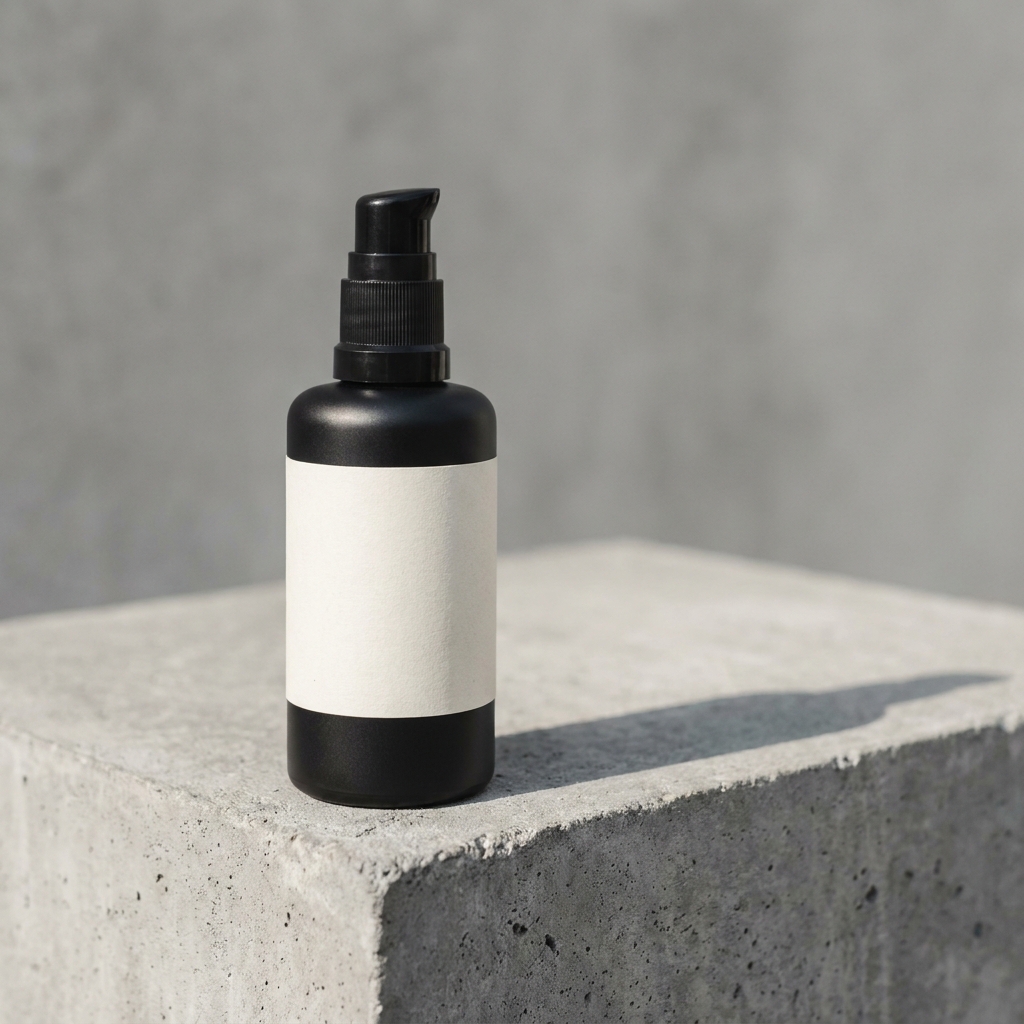
Matte black skincare pump bottle standing on a raw poured concrete slab with one clean diagonal shadow falling to the right
Chunky white leather trainer placed on a rough grey concrete step, with a crisp graphic shadow cast to the left
Matte black wireless over-ear headphones resting on a smooth grey concrete surface under a single soft shadow

A concrete background in product photography is a surface of raw poured concrete or smooth grey cement. It sits under the product as a floor, or behind it as a wall. Streetwear, trainers, tech hardware, tools and modern skincare all sit well on it, because grey reads as urban and plain without adding any colour of its own. The surface works by brightness alone. Cement is close to mid grey, so the product has to be clearly lighter or clearly darker than the slab, and one hard shadow has to do the rest. That is why a mid grey or silver product fails here. The two tones merge and the outline of the product disappears. Food, baby goods and soft textiles fail for a different reason. Concrete is cold and hard, and that works against what those products promise.

Four craft problems on concrete

The four things that break a concrete frame, and the fix for each one.

Grey product on grey concrete

Concrete sits around mid grey. A grey or silver product placed on it has almost no difference in brightness, so the edges vanish and the shape goes flat. Fix this with light, not with colour. A hard key from behind and to one side draws a bright line along the top edge of the product. If that is not enough, ask for a paler trowelled slab, so the product stays clearly darker than the surface.

Hard sun, one crisp shadow

Most surfaces want soft light. Concrete wants the opposite. One hard source, like midday sun about 40 degrees above the slab, throws a sharp shadow that becomes part of the picture. Two shadows read as a mistake, so ask for no fill light on the second side. The shadow has to start at the base of the product. A gap of even a few millimetres tells a shopper the product was pasted on.

Aggregate size fights small products

Poured concrete carries stones. On a rough slab they run 10 to 20 millimetres across. Behind a 300mm trainer that grain looks correct. Behind a 60mm lipstick the same stones look like boulders, and the product reads as a toy. For small items ask for a smooth trowelled finish or a fine sand float. Keep the coarse aggregate for footwear, tools and large boxes.

Concrete shows every colour cast

Cement grey is close to neutral, so the slab behaves like a grey card. Any wrong white balance appears in it at once. Under open sky with no direct sun, concrete takes blue from above and can turn slightly green. A white product goes cold with it. In direct sun near 5600K the same slab reads warm grey. Name the light in the prompt, then judge the cast on the concrete first and on the product second.

Four apps for concrete frames

What each DesignerBox app does on a grey concrete set.

Poured slabs and smooth walls
Styled Scene Generator

Poured slabs and smooth walls

Styled Scene Generator places your uploaded product on a concrete surface you describe in words. Name the finish and the grain: a raw poured slab with 10mm aggregate, or a smooth trowelled grey wall. Name the sun as well, because the app builds the surface and the shadow in one pass. Write one hard shadow to the right and every product in the range gets the same set.

Open the tool


Turn flat light into sun - Before
Before
Turn flat light into sun - After
After
Spotlight Relight

Turn flat light into sun

Spotlight Relight changes the light on a photo you already have. It is on the Premium plan. Concrete shot under cloud looks dull, because the slab has no shadow to give it depth. Ask for a hard key from the left at a low angle and the flat frame gains one graphic shadow. You can also add a bright rim on a dark product, so it separates from the grey behind it.

Open the tool
Headline room on bare slab - Before
Before
Headline room on bare slab - After
After
Product Ad Generator

Headline room on bare slab

Product Ad Generator puts a finished frame into an ad layout with room for a headline and a price. Concrete helps here, because a plain slab has tone but no pattern, so white text stays readable across it. Keep the product and its shadow on one side and leave the empty concrete on the other. The grain gives texture without competing with the words.

Open the tool
Vertical street drops
Social Media Ad Studio

Vertical street drops

Social Media Ad Studio builds paid and organic social formats from the same concrete frame. In a 9:16 crop the shadow can run down the frame instead of across it. That fills the tall space a square crop wastes. Concrete reads as street, so it fits trainer drops, tech launches and skincare that wants a cold, plain look.

Open the tool

Each before and after above demonstrates the tool named on the card, using that app's own sample image, so the subject you see may not be from this industry. Run the same tool on your own photos to see it on your work.

Four steps to a concrete set

Pick the slab, set the sun, check the brightness gap, then upscale.

1
Pick the slab tone and grain
Start with the concrete itself. Hold your product next to a photo of the slab you want. If both sit at the same brightness, choose a lighter or a darker concrete instead. Then pick the grain: smooth trowelled for anything under 100mm, raw poured with visible stones for footwear, tools and large boxes.
2
Upload one photo of the product
Upload a single sharp photo of the real item. Uploading your own product photo is on Pro and above. Concrete depends on edges, so shoot the product where its outline is clean and no part is cropped away. A plain wall and daylight from a window are enough. DesignerBox reads the shape, the material and the label, then builds the concrete around them.
3
Set the sun and the shadow
Write the light into the prompt. Say hard low sun from the left at about 40 degrees, one shadow to the right, no fill. Run it, then check that the shadow starts at the base of the product. Each run costs 4 to 10 credits, so trying three sun angles costs under a dollar in credits.
4
Check the brightness gap, then upscale
Open the frame and turn the colour off. The product and the slab should read as two clearly different tones. If they merge, run it again on a paler or a darker slab. Then look at the empty concrete for a colour cast, because a near neutral grey shows blue or green long before the product does. Grain is the first thing a small file loses, so finish with Image upscale, which is on the Premium plan. At full size the stones stay separate stones instead of turning into grey noise.

Working order on concrete

Slab first, light second, everything else after that. On concrete the light does the separating, so there is no point relighting a slab whose tone you may still change. Once the tone is set, the sun angle decides the shadow. On this surface the shadow is a large part of the picture. Placement follows the shadow, not the reverse, because moving the product changes where the shadow lands and what it crosses. The brightness check comes last of the creative steps, since only the final frame shows whether the product edge holds against the grey. Upscale after that. A 4K copy of a flat frame is still a flat frame.

Four files a concrete set needs

What each frame in a concrete set has to prove.

A hero with one hard shadow

One frame with the product on the slab and a single crisp shadow running off to one side. The shadow must begin where the product meets the concrete, with no gap. Its edge should stay sharp for the first 50mm and spread after that. Real sun behaves that way, and shoppers recognise it.

An edge-lit frame for dark products

One frame where a hard light sits behind and to the side, drawing a bright line along the top edge of the product. This is the file that proves a black bottle or a charcoal speaker still has a shape on grey. Without it, dark products on concrete read as a flat silhouette.

A smooth wall frame

One frame against a trowelled grey wall with no visible stones. Small items need this, because coarse aggregate behind a 60mm product turns the background into the subject. The wall version also crops well to square and to portrait, since there is no grain pattern to line up.

An ad frame with copy space

One wide frame with the product and its shadow on the left and bare concrete on the right. The empty slab has to hold white text at a readable contrast, so keep that side out of deep shade. Product Ad Generator then places a headline and a price on the clear side.

Models and concrete texture

Concrete puts one demand on a model ahead of all the others. The stones have to look like stones. A poured slab is thousands of small hard edges, and a model that treats them as a texture pattern returns a grey blur that reads as plastic. FLUX draws that coarse aggregate with the most bite, so it suits a rough poured slab and large products. Nano Banana Pro is gentler on the grain, and in exchange it leaves an uploaded product untouched while it builds the surface underneath. Run your prompt on both, then judge the result at full size. Grain that looks convincing in a thumbnail often falls apart when the stones are 20mm on screen.

Concrete background questions

Six questions sellers ask before shooting a product on concrete.

What colour concrete works best for product photography?
Mid grey concrete works for most products, but the right choice depends on the product tone. Put a pale, near white trowelled slab under a black or navy product. Put a darker charcoal slab under a white or cream one. Keep the two clearly apart in brightness, about two stops. Avoid mid grey when the product is itself grey or silver. Both then sit at the same brightness, and the edge disappears.
How do I stop a grey product disappearing on a concrete background?
Light is what separates it, so add a hard key from behind and to one side. That draws a bright line along the top edge and the product gets its shape back. A second option is to change the slab tone, since paler concrete pushes a grey product forward. Check the result in black and white. If product and slab read as one tone with the colour removed, the frame has failed, even when it looks acceptable in colour.
Why does concrete look blue or green in my photos?
Because cement grey is nearly neutral, so it shows whatever colour the light has. Under open sky with no direct sun, the slab takes blue from above and can turn slightly green as well. In direct sun near 5600K the same concrete reads warm grey. Name the light in the prompt, such as hard midday sun or open shade. Then judge the cast on the empty part of the slab, where it is easiest to see.
Should the shadow be hard or soft on concrete?
Hard, in most cases. Concrete is one of the few product surfaces where a sharp shadow helps. The shadow becomes a graphic shape against a plain field. Ask for a single source and no fill on the other side. Two shadows look like a studio error. Keep the shadow edge crisp for the first 50mm from the product, then let it spread. Soft light suits linen and paper, not this surface.
Which products suit a concrete background?
Streetwear, trainers, tech hardware, tools, candles and modern skincare all suit concrete. The grey reads as urban and cold, which matches those categories. It works less well for food, baby products, flowers and soft textiles, where a warmer surface supports the promise better. Colour matters as much as category. A bright orange trainer separates well from grey concrete, while a silver laptop on the same slab loses its outline.
How do I make concrete look expensive and not like a building site?
Keep the slab clean and even, and light it from one side only. Cracks, oil stains, chipped corners and form lines read as a construction site. Ask for a fine trowelled or sand float finish, with no damage near the product. Even tone matters more than texture. One hard shadow on clean grey reads as a modern shop. The same shadow on a stained, patched slab reads as a car park.

The full background catalogue

The catalogue lists all twelve backgrounds side by side, so you can compare concrete with marble, linen and the rest.

Compare all twelve

Put your product on concrete

The free plan comes with 112 credits, so you can generate concrete frames and judge the slab tone and the shadow for yourself. Free frames carry a watermark, and you may not sell with them. Uploading your own product photo, and selling with the result, start on Pro.

Start free